


2026 Updated Verified AB-100 Q&As - Pass Guarantee or Full Refund
[May-2026] AB-100 Certification with Actual Questions from Test4Engine
NEW QUESTION # 10
Scenario: A cybersecurity leader is reviewing the organization's strategy for integrating Artificial Intelligence, recognizing both the immense potential and the inherent risks. They are particularly interested in Microsoft's recommended comprehensive approach to security in the age of AI.
According to Microsoft's "dual approach to AI for security," which two key priorities must organizations address simultaneously to build a robust security posture in an AI-driven environment?
- A. Accelerating SaaS adoption and optimizing model tuning
- B. Focusing on content generation and API monitoring
- C. Building generative AI solutions and disabling legacy security tools
- D. Using AI to enhance security defenses and securing AI systems themselves
Answer: D
Explanation:
Using AI to enhance security defenses and securing AI systems themselves is correct because Microsoft advocates a "dual approach." The first priority is leveraging AI capabilities (e.g., threat detection, anomaly analysis) to strengthen existing security defenses. The second, equally crucial priority is to secure the AI systems themselves, protecting against prompt injection, data poisoning, model theft, and ensuring responsible AI principles are applied to AI deployments.
Reference:
https://techcommunity.microsoft.com/blog/microsoftdefendercloudblog/unlocking-business-value- microsofts-dual-approach-to-ai-for-security-and-securit/4466811
NEW QUESTION # 11
Case Study 1 - Fabrikam, Inc
Background
Fabrikam, Inc., is a global consumer goods company that is undergoing a digital transformation initiative to migrate its entire infrastructure to the Microsoft cloud. As a key element of this cloud migration, the company will implement Microsoft Dynamics 365 Sales, moving away from the current on-premises proprietary technologies used by its business-to-business (B2B) sales team.
As part of the cloud migration, Fabrikam will adopt an AI-first approach to its business solutions and implement AI solutions, wherever possible, to streamline operations.
Problem Statements
Fabrikam's infrastructure currently relies on various on-premises systems that require sales executives to use corporate computers with physical keyboards to access business information during customer interactions. Mobile phones cannot be used for these purposes, as the systems depend on keyboard input. As a result, the sales executives spend a lot of time using keyboards to search for data on several disparate systems and file servers, rather than focusing on the customers. This affects the customer experience.
Fabrikam stakeholders are concerned that users will be hesitant to adopt AI. If the AI initiatives are NOT adopted, cost savings will never be realized. Additionally, funding for future AI initiatives will depend on demonstrating an increase in AI adoption month over month. As the AI agent initiative for the sales team will be the first for Fabrikam, the rapid adoption of the agent is a high priority.
Planned Initiatives
General
Fabrikam management has prioritized AI-driven projects to improve efficiency, customer engagement, and responsible AI adoption. The current application infrastructure is on-premises and must be migrated to the cloud to support the adoption of these technologies.
Infrastructure Migration
Fabrikam plans to migrate from its current on-premises infrastructure to a completely cloud-based topology; this will include user authentication, the security framework, and, primarily, the adoption of the services by end users.
All the data from the different systems will be consolidated into a single data source - a common data model that will use a Microsoft Dataverse environment as a single source of truth (SSOT) for the sales team.
Sales Cycle Enablement
To achieve the company's objectives, Fabrikam intends to implement the following strategies to enhance the sales cycle:
- Use low-code development to create a single AI agent that has
Dataverse as its core component.
- Ensure that sales managers can access unanswered correspondence from
prospects and intervene as appropriate.
- Replace the previous proprietary software with Dynamics 365 Sales to
track sales cycles and customer interactions.
- Have the sales executives use Dynamics 365 Sales to track
interactions for open opportunities and send follow-up communications
to prospects.
- Have the sales executives use handsfree headsets to interact with an
AI agent when they have questions about internal policies or customer
data.
Requirements
Infrastructure Migration
Fabrikam has identified the following infrastructure migration requirements:
- Azure must be used for all future infrastructure workloads.
- The company must follow Microsoft-recommended methodologies for
infrastructure migration to the cloud.
- Any created AI agents must have their return on investment (ROI)
calculated to ensure that the solution will save the company money.
Sales Cycle Enablement
Fabrikam has identified the following requirements for sales cycle enablement:
- The final AI agent must follow Microsoft recommendations for a
conversational user experience.
- A designated checklist must be reviewed to ensure that the AI agent
follows Microsoft deployment recommendations for a compliant solution.
- Detailed telemetry must be logged for the first created AI agent to
help troubleshoot and optimize the agent during the initial AI agent
adoption process.
- Unexpected AI agent actions must end in an escalation to a live
representative. For example, a sales executive must be rerouted to a
representative if the agent cannot answer a question after two failed
attempts.
- The return on investment (ROI) of switching from the current process
to the future process is required for stakeholder sign off.
- The sales team must use Dynamics 365 Sales to correspond with
prospects more quickly and efficiently than currently.
- Sales managers must report on the adoption of the AI agent to key
Fabrikam stakeholders on a monthly basis.
- Any sensitive information, such as user IDs and names, shared via the AI agent must be tracked for future auditing.
Hotspot Question
Which components should you use to meet the sales cycle enablement requirements? To answer, select the appropriate options in the answer area.
NOTE: Each correct selection is worth one point.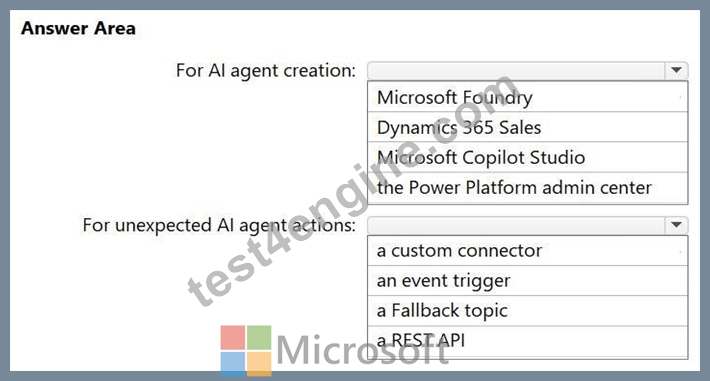
Answer:
Explanation: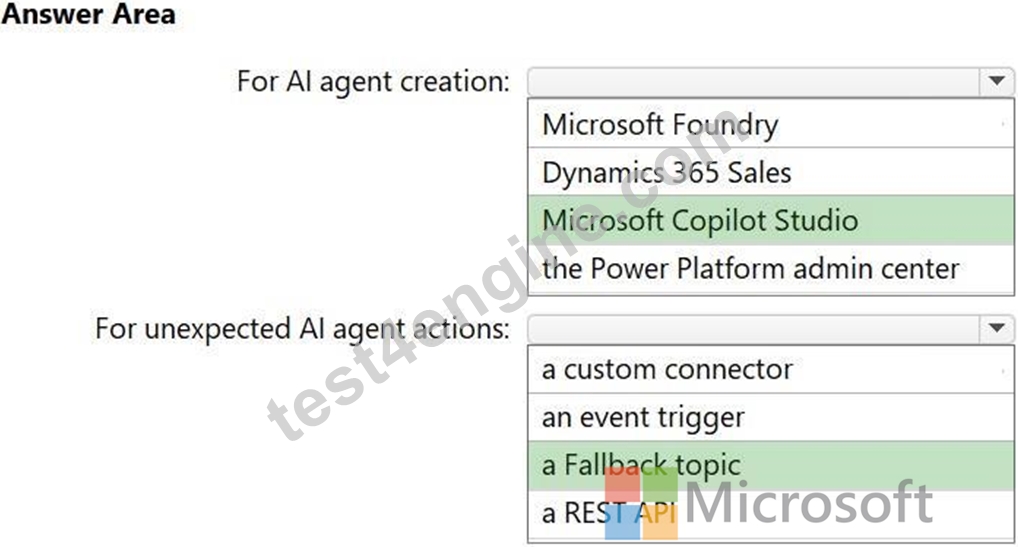
Explanation:
Scenario:
Use low-code development to create a single AI agent that has Dataverse as its core component.
Box 1: Microsoft Copilot Studio
For AI agent creation
Scenario:
A designated checklist must be reviewed to ensure that the AI agent follows Microsoft deployment recommendations for a compliant solution.
The Microsoft tool that should be used to create the AI agent is Microsoft Copilot Studio.
It is a low-code platform specifically designed for building and managing intelligent agents that integrate with Microsoft Dataverse as a core component for storing data and providing business context. To ensure the agent follows Microsoft's deployment recommendations, users should consult the implementation checklist provided within the Microsoft Copilot Studio documentation.
Key Features of Microsoft Copilot Studio:
Low-Code Interface: Uses a graphical builder or natural language to design agent behaviors and conversation flows.
Dataverse Integration: Leverages Dataverse as the enterprise data platform to ground agents in organizational knowledge and store shared context.
Governance and Compliance: Includes built-in responsible AI features and aligns with enterprise security standards.
Multi-Channel Deployment: Allows publishing agents across Microsoft Teams, websites, and mobile apps.
Box 2: a Fallback topic
For unexpected AI agent actions.
Scenario:
Unexpected AI agent actions must end in an escalation to a live representative. For example, a sales executive must be rerouted to a representative if the agent cannot answer a question after two failed attempts.
In a low-code environment using Microsoft Copilot Studio with Dataverse, you can ensure unexpected AI actions lead to a live representative by configuring specific system topics.
1. Configure the System Fallback Topic
The Fallback system topic triggers when the AI agent cannot match a user's intent to any existing topic or knowledge source with sufficient confidence.
Enable Fallback: In Copilot Studio, navigate to Settings > General Settings > System fallback and click Add.
Action: Edit the Fallback topic to include a Go to topic node that redirects to the Escalate system topic.
2. Implement the Escalate System Topic
The Escalate topic is the primary mechanism for handoffs.
3. Handle Errors and Infinite Loops
Reference:
https://learn.microsoft.com/en-us/power-apps/maker/data-platform/low-code-plugins-copilot- studio
NEW QUESTION # 12
Drag and Drop Question
A company has an AI solution that uses a Microsoft Copilot Studio agent.
You need to monitor the agent's performance. The solution must meet the following requirements:
- Monitor the agent's telemetry in near-real-time (NRT).
- Download transcripts of full conversations.
- Monitor the agent's usage and performance.
What should you use for each requirement? To answer, drag the appropriate options to the correct requirements. Each option may be used once, more than once, or not at all. You may need to drag the split bar between panes or scroll to view content.
NOTE: Each correct selection is worth one point.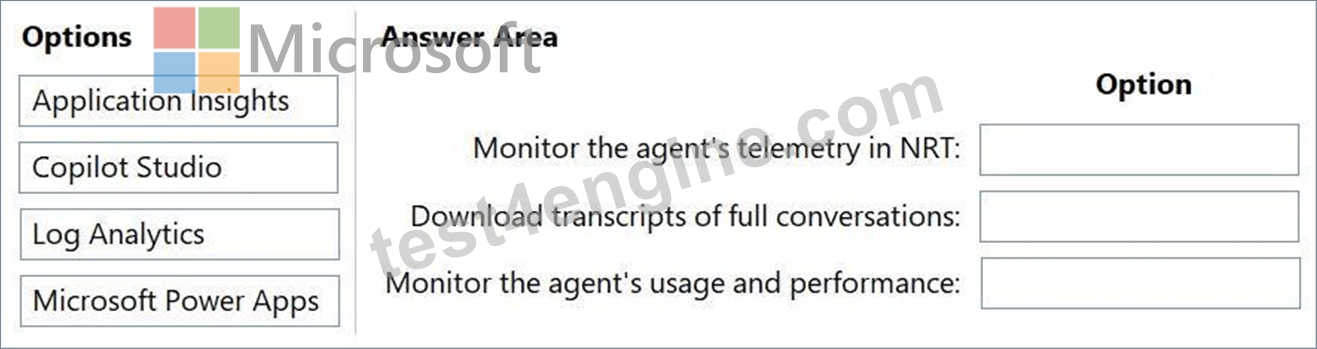
Answer:
Explanation: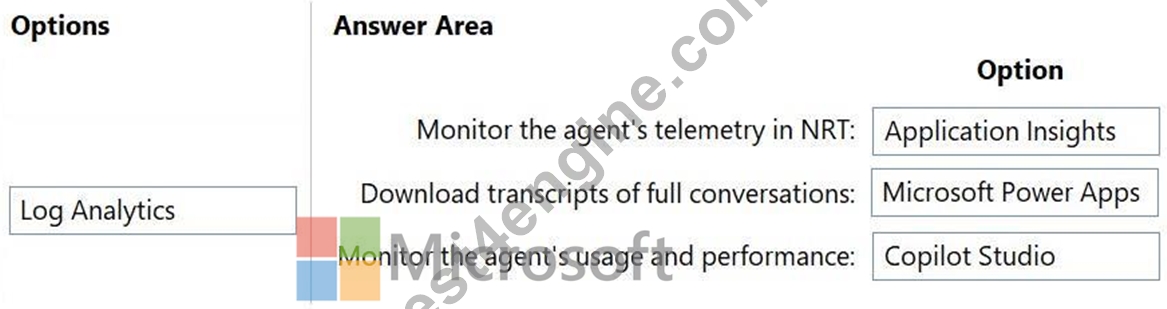
Explanation:
Box 1: Application Insights
Monitor the agent's telemetry in near-real-time (NRT).
To monitor Microsoft Copilot Studio agent performance and telemetry in near-real-time (NRT), the best tool to use is Azure Application Insights.
By connecting your Copilot Studio agent to an Azure Application Insights instance, you can capture detailed runtime data, including user messages, topics triggered, and custom events as they happen.
Box 2: Microsoft Power Apps
Download transcripts of full conversations.
To monitor Microsoft Copilot Studio agent performance, you can download full conversation transcripts for the last 29 days using the Power Apps portal to analyze user interactions. Access Dataverse via Power Apps, navigate to tables, select ConversationTranscript, and export the data as a CSV file to identify engagement, resolution, and escalation patterns.
Steps to Download Transcripts via Power Apps:
1. Sign in to make.powerapps.com.
2. Select the correct environment in the top right corner.
3. In the side menu, select Tables (or Data > Entities in older views).
4. Search for and select the ConversationTranscript table.
5. Select Export data from the top menu.
6. Once compiled, select Download exported data to save the file.
Box 3: Copilot Studio
Monitor the agent's usage and performance.
To monitor a Microsoft Copilot Studio agent's usage and performance, you can use the built-in Analytics page in Copilot Studio, which provides comprehensive data on key metrics, conversation outcomes, and user satisfaction.
Reference:
https://reshmeeauckloo.com/posts/copilot-connecting-application-insights
https://learn.microsoft.com/en-us/microsoft-copilot-studio/analytics-overview
https://learn.microsoft.com/en-us/microsoft-copilot-studio/analytics-overview
NEW QUESTION # 13
A company extends Copilot in Microsoft Dynamics 365 Customer Service.
You need to recommend an automated application lifecycle management (ALM) process so that the Copilot components can be safely developed, tested, and promoted to production.
Which two actions should you include in the ALM process? Each correct answer presents part of the solution.
NOTE: Each correct selection is worth one point.
- A. Rebuild the agents in each environment.
- B. Use an unmanaged solution in production.
- C. Store the agent transcripts in source control.
- D. Use Microsoft Power Platform pipelines.
- E. Include the components in a solution.
Answer: D,E
Explanation:
To implement an automated Application Lifecycle Management (ALM) process for extending Microsoft Dynamics 365 Customer Service with Copilot, you should leverage Power Platform solutions and pipelines. This approach ensures that custom agents, knowledge sources, and connector actions are developed and promoted safely across environments.
Tools used include:
Power Platform Pipelines: Automates the deployment process across environments.
To automate the application lifecycle management (ALM) for Copilot components within Microsoft Dynamics 365 Customer Service, follow this structured process using Power Platform pipelines and solutions:
1. Solution-Centric Development
All Copilot components (agents, topics, custom actions, and connector plugins) must be developed within a Power Platform solution.
Create or Select a Solution: In Copilot Studio or the Power Apps maker portal, ensure you are working within an unmanaged solution in your Development environment.
Add Components: When you create new agents or actions in Microsoft Copilot Studio, they are automatically associated with the preferred solution you have set, ensuring they are portable.
2. Pipeline Configuration
Power Platform pipelines democratize ALM by providing a built-in CI/CD experience directly within the maker portal.
Reference:
https://intelequia.com/en/blog/post/maximize-the-value-of-power-platform-with-effective-alm-and- the-power-of-ai
https://learn.microsoft.com/en-us/power-platform/release-plan/2024wave2/microsoft-copilot- studio/solution-management-copilot-studio
NEW QUESTION # 14
Hotspot Question
You are designing a testing solution for a Microsoft Copilot Studio agent that integrates with Microsoft Dynamics 365 Customer Service and Dynamics 365 Sales.
You need to design end-to-end scenarios to test the agent's ability to perform the following actions:
- Coordinate tasks and data interactions across both Dynamics 365 apps.
- Interpret user input and provide contextually relevant outputs.
Which test scenario and metric should you include in the design? To answer, select the appropriate options in the answer area.
NOTE: Each correct selection is worth one point.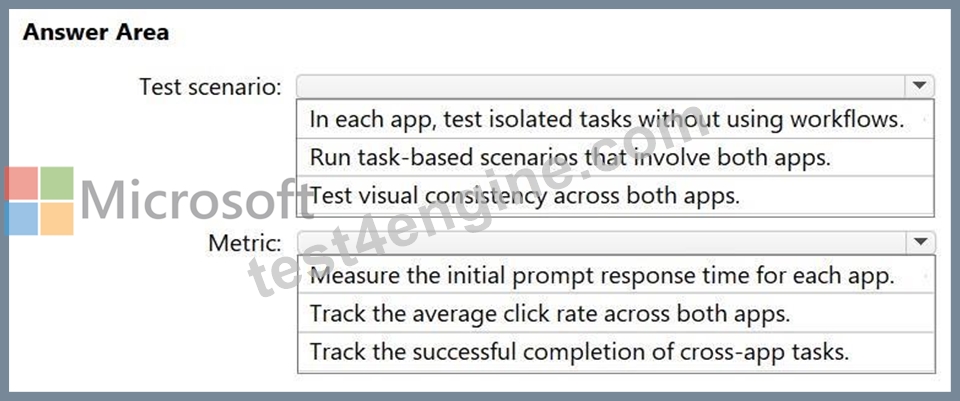
Answer:
Explanation: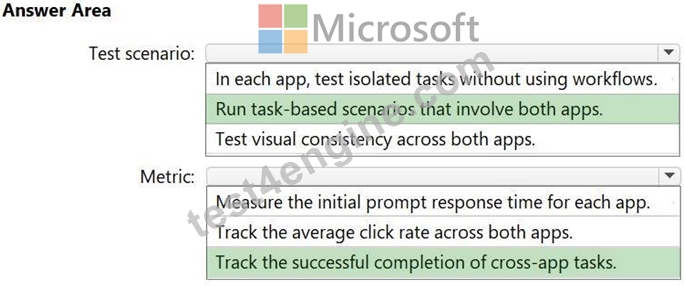
Explanation:
Box 1: Run task-based scenarios that involve both apps
Test scenario
Task-Based Testing Scenarios
Run these end-to-end scenarios to verify the agent's ability to interpret context and coordinate data:
Scenario 1: Cross-Sell Opportunity Discovery
Task: While resolving a support case in Customer Service, ask the agent: "Are there any active sales opportunities for this account?".
Success Criteria: The agent retrieves the relevant Opportunity from Sales, summarizes it, and suggests a follow-up action for the sales team.
Scenario 2: Integrated Case/Lead Creation
Task: A user mentions a new product interest during a support chat. Command the agent:
"Create a lead in Sales based on this support conversation".
Success Criteria: The agent parses the conversation history and creates a Lead record in Sales with the correct customer context.
Scenario 3: Proactive Account Health Check
Task: Before a sales meeting, ask: "Summarize recent support issues for this account".
Success Criteria: The agent identifies open tickets in Customer Service and provides a summary to the Sales professional to prevent walking into a "blind" meeting.
Box 2: Track the successful completion of cross-app tasks
Metric
Key Metrics for Success
Track these specific metrics in the Copilot Studio Analytics tab or the Power Platform Admin Center:
*-> Resolution Rate (Cross-App): The percentage of sessions where the agent successfully completed a task requiring data from both apps without manual intervention.
Deflection Rate: Reduction in human handoffs for tasks that previously required an agent to switch manually between Sales and Service hubs.
Task Success Threshold: Define a minimum quality score for LLM-based responses to ensure the context provided from the "other" app is accurate.
Agent Assisted Hours Gained: Measure the time saved by the agent performing these cross-app queries versus a human doing so manually.
Reference:
https://walkingtree.tech/dynamics-365-agents-with-microsoft-copilot-studio
https://learn.microsoft.com/en-us/power-platform/admin/monitoring/monitor-copilot-studio
NEW QUESTION # 15
Case Study 1 - Fabrikam, Inc
Background
Fabrikam, Inc., is a global consumer goods company that is undergoing a digital transformation initiative to migrate its entire infrastructure to the Microsoft cloud. As a key element of this cloud migration, the company will implement Microsoft Dynamics 365 Sales, moving away from the current on-premises proprietary technologies used by its business-to-business (B2B) sales team.
As part of the cloud migration, Fabrikam will adopt an AI-first approach to its business solutions and implement AI solutions, wherever possible, to streamline operations.
Problem Statements
Fabrikam's infrastructure currently relies on various on-premises systems that require sales executives to use corporate computers with physical keyboards to access business information during customer interactions. Mobile phones cannot be used for these purposes, as the systems depend on keyboard input. As a result, the sales executives spend a lot of time using keyboards to search for data on several disparate systems and file servers, rather than focusing on the customers. This affects the customer experience.
Fabrikam stakeholders are concerned that users will be hesitant to adopt AI. If the AI initiatives are NOT adopted, cost savings will never be realized. Additionally, funding for future AI initiatives will depend on demonstrating an increase in AI adoption month over month. As the AI agent initiative for the sales team will be the first for Fabrikam, the rapid adoption of the agent is a high priority.
Planned Initiatives
General
Fabrikam management has prioritized AI-driven projects to improve efficiency, customer engagement, and responsible AI adoption. The current application infrastructure is on-premises and must be migrated to the cloud to support the adoption of these technologies.
Infrastructure Migration
Fabrikam plans to migrate from its current on-premises infrastructure to a completely cloud-based topology; this will include user authentication, the security framework, and, primarily, the adoption of the services by end users.
All the data from the different systems will be consolidated into a single data source - a common data model that will use a Microsoft Dataverse environment as a single source of truth (SSOT) for the sales team.
Sales Cycle Enablement
To achieve the company's objectives, Fabrikam intends to implement the following strategies to enhance the sales cycle:
- Use low-code development to create a single AI agent that has
Dataverse as its core component.
- Ensure that sales managers can access unanswered correspondence from
prospects and intervene as appropriate.
- Replace the previous proprietary software with Dynamics 365 Sales to
track sales cycles and customer interactions.
- Have the sales executives use Dynamics 365 Sales to track
interactions for open opportunities and send follow-up communications
to prospects.
- Have the sales executives use handsfree headsets to interact with an
AI agent when they have questions about internal policies or customer
data.
Requirements
Infrastructure Migration
Fabrikam has identified the following infrastructure migration requirements:
- Azure must be used for all future infrastructure workloads.
- The company must follow Microsoft-recommended methodologies for
infrastructure migration to the cloud.
- Any created AI agents must have their return on investment (ROI)
calculated to ensure that the solution will save the company money.
Sales Cycle Enablement
Fabrikam has identified the following requirements for sales cycle enablement:
- The final AI agent must follow Microsoft recommendations for a
conversational user experience.
- A designated checklist must be reviewed to ensure that the AI agent
follows Microsoft deployment recommendations for a compliant solution.
- Detailed telemetry must be logged for the first created AI agent to
help troubleshoot and optimize the agent during the initial AI agent
adoption process.
- Unexpected AI agent actions must end in an escalation to a live
representative. For example, a sales executive must be rerouted to a
representative if the agent cannot answer a question after two failed
attempts.
- The return on investment (ROI) of switching from the current process
to the future process is required for stakeholder sign off.
- The sales team must use Dynamics 365 Sales to correspond with
prospects more quickly and efficiently than currently.
- Sales managers must report on the adoption of the AI agent to key
Fabrikam stakeholders on a monthly basis.
- Any sensitive information, such as user IDs and names, shared via the AI agent must be tracked for future auditing.
Which tool should you recommend to address the sensitive information concerns in the sales process?
- A. Model Context Protocol (MCP)
- B. Application Insights
- C. Monitoring in Microsoft Foundry
- D. the Analytics tab in Microsoft Copilot Studio
- E. Microsoft Foundry Tracing UI
Answer: E
Explanation:
Scenario:
Fabrikam has identified the following requirements for sales cycle enablement:
Any sensitive information, such as user IDs and names, shared via the AI agent must be tracked for future auditing.
In a Microsoft AI solution involving an agent where you must track sensitive information for auditing, you should use the Microsoft Foundry Tracing UI.
Tracking and Auditing with Microsoft Foundry Tracing
The Microsoft Foundry Tracing UI (part of Microsoft Foundry) provides end-to-end visibility into agent runs by capturing detailed telemetry through OpenTelemetry.
What is Captured: It automatically logs user inputs, model outputs, and tool arguments, which often contain sensitive information like names or IDs.
Auditing and Debugging: You can search, filter, and sort traces from the last 90 days to observe exactly how your agent responded during specific sessions.
Infrastructure: Traces are stored in Azure Application Insights, allowing you to apply standard enterprise access controls and retention policies.
Reference:
https://learn.microsoft.com/en-us/azure/ai-foundry/observability/concepts/trace-agent-concept
NEW QUESTION # 16
A company plans to deploy a Microsoft Dynamics 365 Contact Center agent.
You need to ensure that the agent can transfer the conversation to a live customer service representative.
Which two components should you include in the solution? Each correct answer presents part of the solution.
NOTE: Each correct selection is worth one point.
- A. Customer engagement hub
- B. an Azure AI Bot Service skill
- C. Microsoft Foundry
- D. Microsoft 365 Agents Toolkit
- E. Microsoft Copilot Studio
Answer: A,E
Explanation:
To implement a Microsoft Dynamics 365 Contact Center solution that enables seamless handoff between a virtual agent and a live representative, you must integrate Microsoft Copilot Studio with the Customer Engagement Hub (typically Dynamics 365 Customer Service or Omnichannel).
Core Components & Setup
1. Copilot Studio Configuration:
Connect to Engagement Hub: In Copilot Studio, navigate to Settings > Customer Engagement Hub and select Dynamics 365 Customer Service.
Enable Agent Transfer: Under the Channels tab, select the Dynamics 365 Customer Service tile and click Connect. This establishes the link between the bot and your live agent environment.
Configure Handoff Topic: Modify the Escalate system topic or create a custom topic. Use the Transfer conversation node to trigger the move to a live representative. You can include a private message to the agent to provide context.
2. Customer Engagement Hub (Dynamics 365) Setup:
Workstream Integration: In the Customer Service Admin Center, create or open a workstream (e.g., for Live Chat or Voice). Add your Copilot Studio agent to this workstream to ensure it is the first point of contact.
Routing Rules: Define rules to route the escalated conversation to the correct live agent queue based on context variables passed from the bot.
3. Handoff Experience:
Context Sharing: When a transfer occurs, the live representative receives the full conversation transcript and any variables collected by the bot, allowing them to resume the interaction without asking the customer to repeat information.
Agent Workspace: Live agents accept the transfer through the Customer Service Workspace or Omnichannel for Customer Service.
Reference:
https://learn.microsoft.com/en-us/microsoft-copilot-studio/customer-copilot-overview
NEW QUESTION # 17
Case Study 1 - Fabrikam, Inc
Background
Fabrikam, Inc., is a global consumer goods company that is undergoing a digital transformation initiative to migrate its entire infrastructure to the Microsoft cloud. As a key element of this cloud migration, the company will implement Microsoft Dynamics 365 Sales, moving away from the current on-premises proprietary technologies used by its business-to-business (B2B) sales team.
As part of the cloud migration, Fabrikam will adopt an AI-first approach to its business solutions and implement AI solutions, wherever possible, to streamline operations.
Problem Statements
Fabrikam's infrastructure currently relies on various on-premises systems that require sales executives to use corporate computers with physical keyboards to access business information during customer interactions. Mobile phones cannot be used for these purposes, as the systems depend on keyboard input. As a result, the sales executives spend a lot of time using keyboards to search for data on several disparate systems and file servers, rather than focusing on the customers. This affects the customer experience.
Fabrikam stakeholders are concerned that users will be hesitant to adopt AI. If the AI initiatives are NOT adopted, cost savings will never be realized. Additionally, funding for future AI initiatives will depend on demonstrating an increase in AI adoption month over month. As the AI agent initiative for the sales team will be the first for Fabrikam, the rapid adoption of the agent is a high priority.
Planned Initiatives
General
Fabrikam management has prioritized AI-driven projects to improve efficiency, customer engagement, and responsible AI adoption. The current application infrastructure is on-premises and must be migrated to the cloud to support the adoption of these technologies.
Infrastructure Migration
Fabrikam plans to migrate from its current on-premises infrastructure to a completely cloud-based topology; this will include user authentication, the security framework, and, primarily, the adoption of the services by end users.
All the data from the different systems will be consolidated into a single data source - a common data model that will use a Microsoft Dataverse environment as a single source of truth (SSOT) for the sales team.
Sales Cycle Enablement
To achieve the company's objectives, Fabrikam intends to implement the following strategies to enhance the sales cycle:
- Use low-code development to create a single AI agent that has
Dataverse as its core component.
- Ensure that sales managers can access unanswered correspondence from
prospects and intervene as appropriate.
- Replace the previous proprietary software with Dynamics 365 Sales to
track sales cycles and customer interactions.
- Have the sales executives use Dynamics 365 Sales to track
interactions for open opportunities and send follow-up communications
to prospects.
- Have the sales executives use handsfree headsets to interact with an
AI agent when they have questions about internal policies or customer
data.
Requirements
Infrastructure Migration
Fabrikam has identified the following infrastructure migration requirements:
- Azure must be used for all future infrastructure workloads.
- The company must follow Microsoft-recommended methodologies for
infrastructure migration to the cloud.
- Any created AI agents must have their return on investment (ROI)
calculated to ensure that the solution will save the company money.
Sales Cycle Enablement
Fabrikam has identified the following requirements for sales cycle enablement:
- The final AI agent must follow Microsoft recommendations for a
conversational user experience.
- A designated checklist must be reviewed to ensure that the AI agent
follows Microsoft deployment recommendations for a compliant solution.
- Detailed telemetry must be logged for the first created AI agent to
help troubleshoot and optimize the agent during the initial AI agent
adoption process.
- Unexpected AI agent actions must end in an escalation to a live
representative. For example, a sales executive must be rerouted to a
representative if the agent cannot answer a question after two failed
attempts.
- The return on investment (ROI) of switching from the current process
to the future process is required for stakeholder sign off.
- The sales team must use Dynamics 365 Sales to correspond with
prospects more quickly and efficiently than currently.
- Sales managers must report on the adoption of the AI agent to key
Fabrikam stakeholders on a monthly basis.
- Any sensitive information, such as user IDs and names, shared via the AI agent must be tracked for future auditing.
Which tool should you recommend to help secure funding for future AI agent development?
- A. the Analytics tab in Microsoft Copilot Studio
- B. Direct Preference Optimization (DPO)
- C. Azure Operator Insights
- D. Evaluations in Microsoft Foundry
- E. the Azure Cost Optimization workbook
Answer: A
Explanation:
Scenario
Requirements
Any created AI agents must have their return on investment (ROI) calculated to ensure that the solution will save the company money.
--
In a Microsoft AI migration, calculating the Return on Investment (ROI) for AI agents is essential for justifying costs and securing future funding. You can utilize the Analytics tab in Microsoft Copilot Studio to track these financial and performance metrics directly.
Calculating ROI with Copilot Studio Analytics
The Analytics tab provides a dedicated Savings tile (ROI) that allows you to quantify the impact of your agents:
Define Savings Parameters: You can input estimated time saved (in seconds, minutes, or hours) and money saved per successful agent run.
Real-Time Tracking: Total savings are calculated automatically for your selected period based on successful runs of resolved conversations.
Retroactive Application: If you update your savings estimates, the system can apply these changes to previous runs to provide an accurate historical view.
Granular Insights: Savings can be defined at the overall agent-run level or for specific tools used within a run.
Reference:
https://learn.microsoft.com/en-us/training/modules/forecast-agent-return-investment/
NEW QUESTION # 18
Case Study 1 - Fabrikam, Inc
Background
Fabrikam, Inc., is a global consumer goods company that is undergoing a digital transformation initiative to migrate its entire infrastructure to the Microsoft cloud. As a key element of this cloud migration, the company will implement Microsoft Dynamics 365 Sales, moving away from the current on-premises proprietary technologies used by its business-to-business (B2B) sales team.
As part of the cloud migration, Fabrikam will adopt an AI-first approach to its business solutions and implement AI solutions, wherever possible, to streamline operations.
Problem Statements
Fabrikam's infrastructure currently relies on various on-premises systems that require sales executives to use corporate computers with physical keyboards to access business information during customer interactions. Mobile phones cannot be used for these purposes, as the systems depend on keyboard input. As a result, the sales executives spend a lot of time using keyboards to search for data on several disparate systems and file servers, rather than focusing on the customers. This affects the customer experience.
Fabrikam stakeholders are concerned that users will be hesitant to adopt AI. If the AI initiatives are NOT adopted, cost savings will never be realized. Additionally, funding for future AI initiatives will depend on demonstrating an increase in AI adoption month over month. As the AI agent initiative for the sales team will be the first for Fabrikam, the rapid adoption of the agent is a high priority.
Planned Initiatives
General
Fabrikam management has prioritized AI-driven projects to improve efficiency, customer engagement, and responsible AI adoption. The current application infrastructure is on-premises and must be migrated to the cloud to support the adoption of these technologies.
Infrastructure Migration
Fabrikam plans to migrate from its current on-premises infrastructure to a completely cloud-based topology; this will include user authentication, the security framework, and, primarily, the adoption of the services by end users.
All the data from the different systems will be consolidated into a single data source - a common data model that will use a Microsoft Dataverse environment as a single source of truth (SSOT) for the sales team.
Sales Cycle Enablement
To achieve the company's objectives, Fabrikam intends to implement the following strategies to enhance the sales cycle:
- Use low-code development to create a single AI agent that has
Dataverse as its core component.
- Ensure that sales managers can access unanswered correspondence from
prospects and intervene as appropriate.
- Replace the previous proprietary software with Dynamics 365 Sales to
track sales cycles and customer interactions.
- Have the sales executives use Dynamics 365 Sales to track
interactions for open opportunities and send follow-up communications
to prospects.
- Have the sales executives use handsfree headsets to interact with an
AI agent when they have questions about internal policies or customer
data.
Requirements
Infrastructure Migration
Fabrikam has identified the following infrastructure migration requirements:
- Azure must be used for all future infrastructure workloads.
- The company must follow Microsoft-recommended methodologies for
infrastructure migration to the cloud.
- Any created AI agents must have their return on investment (ROI)
calculated to ensure that the solution will save the company money.
Sales Cycle Enablement
Fabrikam has identified the following requirements for sales cycle enablement:
- The final AI agent must follow Microsoft recommendations for a
conversational user experience.
- A designated checklist must be reviewed to ensure that the AI agent
follows Microsoft deployment recommendations for a compliant solution.
- Detailed telemetry must be logged for the first created AI agent to
help troubleshoot and optimize the agent during the initial AI agent
adoption process.
- Unexpected AI agent actions must end in an escalation to a live
representative. For example, a sales executive must be rerouted to a
representative if the agent cannot answer a question after two failed
attempts.
- The return on investment (ROI) of switching from the current process
to the future process is required for stakeholder sign off.
- The sales team must use Dynamics 365 Sales to correspond with
prospects more quickly and efficiently than currently.
- Sales managers must report on the adoption of the AI agent to key
Fabrikam stakeholders on a monthly basis.
- Any sensitive information, such as user IDs and names, shared via the AI agent must be tracked for future auditing.
Which framework should you use for the infrastructure migration?
- A. Microsoft Power Platform Center of Excellence (CoE)
- B. Microsoft Cloud Adoption Framework for Azure
- C. Microsoft Power Platform Project Setup Wizard
- D. Success by Design
Answer: B
Explanation:
For migrating a legacy on-premises infrastructure to Microsoft Dynamics 365 Sales with Dataverse as the Single Source of Truth (SSOT), the recommended framework is the Microsoft Cloud Adoption Framework for Azure (CAF), specifically utilized in conjunction with the Data Management Framework (DMF) for Dynamics 365.
This combined approach ensures a structured transition by focusing on both the strategic adoption of cloud technology and the technical, granular migration of data.
Recommended Framework: Microsoft Cloud Adoption Framework (CAF)
The CAF provides a holistic structure to ensure the migration is secure, compliant, and aligned with business goals.
Plan: Assess legacy data, prioritize workloads, and define the SSOT requirements.
Ready: Set up the Dataverse environment (landing zone) and configure security (Azure Active Directory/Microsoft Entra ID).
Adopt (Migrate): Perform the technical migration of data using ETL (Extract, Transform, Load) processes.
Scenario:
Infrastructure Migration
Fabrikam plans to migrate from its current on-premises infrastructure to a completely cloud-based topology; this will include user authentication, the security framework, and, primarily, the adoption of the services by end users.
All the data from the different systems will be consolidated into a single data source - a common data model that will use a Microsoft Dataverse environment as a single source of truth (SSOT) for the sales team.
Background
Fabrikam, Inc., is a global consumer goods company that is undergoing a digital transformation initiative to migrate its entire infrastructure to the Microsoft cloud. As a key element of this cloud migration, the company will implement Microsoft Dynamics 365 Sales, moving away from the current on-premises proprietary technologies used by its business-to-business (B2B) sales team.
Reference:
https://learn.microsoft.com/en-us/azure/cloud-adoption-framework/overview
NEW QUESTION # 19
Case Study 1 - Fabrikam, Inc
Background
Fabrikam, Inc., is a global consumer goods company that is undergoing a digital transformation initiative to migrate its entire infrastructure to the Microsoft cloud. As a key element of this cloud migration, the company will implement Microsoft Dynamics 365 Sales, moving away from the current on-premises proprietary technologies used by its business-to-business (B2B) sales team.
As part of the cloud migration, Fabrikam will adopt an AI-first approach to its business solutions and implement AI solutions, wherever possible, to streamline operations.
Problem Statements
Fabrikam's infrastructure currently relies on various on-premises systems that require sales executives to use corporate computers with physical keyboards to access business information during customer interactions. Mobile phones cannot be used for these purposes, as the systems depend on keyboard input. As a result, the sales executives spend a lot of time using keyboards to search for data on several disparate systems and file servers, rather than focusing on the customers. This affects the customer experience.
Fabrikam stakeholders are concerned that users will be hesitant to adopt AI. If the AI initiatives are NOT adopted, cost savings will never be realized. Additionally, funding for future AI initiatives will depend on demonstrating an increase in AI adoption month over month. As the AI agent initiative for the sales team will be the first for Fabrikam, the rapid adoption of the agent is a high priority.
Planned Initiatives
General
Fabrikam management has prioritized AI-driven projects to improve efficiency, customer engagement, and responsible AI adoption. The current application infrastructure is on-premises and must be migrated to the cloud to support the adoption of these technologies.
Infrastructure Migration
Fabrikam plans to migrate from its current on-premises infrastructure to a completely cloud-based topology; this will include user authentication, the security framework, and, primarily, the adoption of the services by end users.
All the data from the different systems will be consolidated into a single data source - a common data model that will use a Microsoft Dataverse environment as a single source of truth (SSOT) for the sales team.
Sales Cycle Enablement
To achieve the company's objectives, Fabrikam intends to implement the following strategies to enhance the sales cycle:
- Use low-code development to create a single AI agent that has
Dataverse as its core component.
- Ensure that sales managers can access unanswered correspondence from
prospects and intervene as appropriate.
- Replace the previous proprietary software with Dynamics 365 Sales to
track sales cycles and customer interactions.
- Have the sales executives use Dynamics 365 Sales to track
interactions for open opportunities and send follow-up communications
to prospects.
- Have the sales executives use handsfree headsets to interact with an
AI agent when they have questions about internal policies or customer
data.
Requirements
Infrastructure Migration
Fabrikam has identified the following infrastructure migration requirements:
- Azure must be used for all future infrastructure workloads.
- The company must follow Microsoft-recommended methodologies for
infrastructure migration to the cloud.
- Any created AI agents must have their return on investment (ROI)
calculated to ensure that the solution will save the company money.
Sales Cycle Enablement
Fabrikam has identified the following requirements for sales cycle enablement:
- The final AI agent must follow Microsoft recommendations for a
conversational user experience.
- A designated checklist must be reviewed to ensure that the AI agent
follows Microsoft deployment recommendations for a compliant solution.
- Detailed telemetry must be logged for the first created AI agent to
help troubleshoot and optimize the agent during the initial AI agent
adoption process.
- Unexpected AI agent actions must end in an escalation to a live
representative. For example, a sales executive must be rerouted to a
representative if the agent cannot answer a question after two failed
attempts.
- The return on investment (ROI) of switching from the current process
to the future process is required for stakeholder sign off.
- The sales team must use Dynamics 365 Sales to correspond with
prospects more quickly and efficiently than currently.
- Sales managers must report on the adoption of the AI agent to key
Fabrikam stakeholders on a monthly basis.
- Any sensitive information, such as user IDs and names, shared via the AI agent must be tracked for future auditing.
Which tool should you use for the prospect communication requirements in Dynamics 365 Sales?
- A. Copilot email assist
- B. Azure AI Search
- C. Deep Research in Microsoft Foundry Agent Service
- D. the Voice template Microsoft Copilot Studio
Answer: A
Explanation:
Scenario:
Requirements
*-> The sales team must use Dynamics 365 Sales to correspond with prospects more quickly and efficiently than currently.
Sales Cycle Enablement
To achieve the company's objectives, Fabrikam intends to implement the following strategies to enhance the sales cycle:
Ensure that sales managers can access unanswered correspondence from prospects and intervene as appropriate.
Have the sales executives use Dynamics 365 Sales to track interactions for open opportunities and send follow-up communications to prospects.
---
In Dynamics 365 Sales, the Copilot email assist feature acts as a powerful accelerator for handling prospects by automating the most time-consuming parts of communication.
Here is how it helps you move faster and more efficiently:
Instant Drafting: You can generate professional-looking email drafts in seconds by choosing a predefined category (like "reply to an inquiry" or "follow up") or by entering your own custom prompt.
Context-Aware Personalization: The AI uses data directly from your CRM-such as past interactions, deal status, and customer notes-to ensure every message is tailored specifically to that prospect's needs.
Tone & Style Adjustments: You can quickly refine the length and tone (e.g., formal, friendly, or urgent) of a draft to better resonate with a particular recipient.
Summarization: When dealing with long email chains, Copilot provides a concise summary of the conversation history, allowing you to catch up instantly without reading through every old message.
Actionable Reminders: It monitors your inbox to identify pending action items or key customer requests you may have missed, ensuring no prospect falls through the cracks.
Seamless Integration: These tools are available directly within the Dynamics 365 Email Rich Text Editor and across Microsoft 365 apps like Outlook and Teams, keeping you in your flow of work.
Reference:
https://learn.microsoft.com/en-us/dynamics365/sales/copilot-overview
NEW QUESTION # 20
You are designing a low-code AI business solution by using Microsoft Copilot Studio.
The solution must include an agent that automates tasks by simulating user interactions across third-party apps and websites, such as clicking buttons, entering text, and extracting information from screens.
You need to recommend what to include in the agent.
What should you recommend?
- A. Computer Use in Copilot Studio
- B. Model Context Protocol (MCP)
- C. a natural language understanding + (NLU+) model in Copilot Studio
- D. Copilot skills
Answer: A
Explanation:
In Microsoft Copilot Studio, you can use the computer use tool (currently in preview) to build low- code agents that automate tasks by simulating human interactions on a Windows computer.
Key Capabilities of Computer Use
UI Interaction: Agents can interact with any system featuring a graphical user interface (GUI), including third-party websites and desktop applications.
*-> Human-like Actions: The tool enables the agent to click buttons, select menus, enter text into fields, and scroll, mimicking a human user.
No API Required: It is particularly useful for automating legacy systems or applications that lack direct API connectors.
Vision-Based Reasoning: Powered by Computer-Using Agents (CUA), the tool uses AI to "see" the screen, allowing it to adapt in real time if button positions or layouts change.
*-> Low-Code Setup: You define what the agent should do using natural language instructions rather than complex coding.
Reference:
https://learn.microsoft.com/en-us/microsoft-copilot-studio/computer-use
NEW QUESTION # 21
A retail company plans to deploy Microsoft Copilot Studio agents to support:
- Microsoft Dynamics 365 Commerce scenarios.
- A Microsoft Power Apps inventory management solution.
You need to recommend a solution to organize product catalog data as a consistent source for multiple AI systems.
What should you recommend?
- A. Let each agent scrape product details from Microsoft SharePoint Online libraries.
- B. Store the product catalog data in a separate custom table for each agent.
- C. Configure prompts to pull product details from the PDFs of external vendors.
- D. Centralize the product catalog data in Microsoft Dataverse and expose the data to both agents.
Answer: D
Explanation:
In the scenario described, centralizing product catalog data in Microsoft Dataverse is the recommended architectural approach to ensure consistency across multiple AI systems.
Dataverse acts as a unified "knowledge network" that allows different agents to share a single source of truth for both structured and unstructured data.
Key Benefits of Centralizing in Dataverse
Cross-App Consistency: By storing the catalog in Dataverse, both the Dynamics 365 Commerce agent and the Power Apps inventory management agent access the exact same records. This prevents data silos where inventory levels or product descriptions might drift apart between systems.
Native Copilot Studio Integration: You can directly add Dataverse tables as knowledge sources in Microsoft Copilot Studio. This allows agents to use Retrieval-Augmented Generation (RAG) to answer queries grounded in your live product data.
Security & Governance: Dataverse enforces Role-Based Access Control (RBAC), ensuring that agents only interact with data they are authorized to see, based on the user's existing permissions.
Automated Updates: You can use Power Platform Dataflows to ingest and synchronize catalog data from external sources into Dataverse, keeping the information fresh for all connected AI agents.
Reference:
https://www.microsoft.com/en-us/power-platform/blog/2025/06/16/data-agent-architecture- powered-by-microsoft-dataverse
NEW QUESTION # 22
A company has a Microsoft Copilot Studio agent that provides answers based on a knowledge base for customer support.
Users report that, occasionally, the agent provides inaccurate answers.
You need to use metrics from the Analytics tab in Copilot Studio to identify the cause of the inaccuracies.
Which two options should you use? Each correct answer presents part of the solution.
NOTE: Each correct selection is worth one point.
- A. quality of generated answers
- B. session information and session outcomes
- C. topic usage and topics with low resolution
- D. engagement, resolution, and escalation rates
- E. survey results
Answer: C,D
Explanation:
[C]
You can use the Analytics dashboard to identify and fix inaccurate responses by focusing on specific performance signals:
*-> Topics with Low Resolution: This metric identifies individual topics where sessions frequently end without a successful outcome. A low resolution rate often indicates that the topic's logic is flawed, the content is outdated, or it fails to address the user's specific intent.
*-> Topic Usage: High usage of certain topics combined with low resolution or high escalation rates points to critical knowledge gaps. Use this to prioritize which parts of your knowledge base need immediate refinement.
Unrecognized Utterances: Review these to find user phrases that didn't trigger any custom topic, indicating missing content or the need for new trigger phrases.
Analyze User Questions by Theme: Copilot Studio uses AI to group generative responses into themes. You can review these clusters to see which themes have poor response quality and need better grounding or data hygiene.
User Feedback (Thumbs Up/Down): Review specific messages with negative feedback in the Analytics tab to understand exactly where the AI is hallucinating or providing incomplete data.
[D]
In Microsoft Copilot Studio, you can use analytics to pinpoint why your agent is providing inaccurate answers by following a structured improvement checklist.
Using Metrics to Locate Problems
*-> Engagement Rate: A low engagement rate often indicates that your triggers are misconfigured or too broad, causing the agent to initiate the wrong topic or fail to recognize user intent entirely.
*-> Resolution Rate: Identify specific topics with low resolution. If a topic has a high volume of sessions but fails to reach a "Resolved" state, it usually means the knowledge source is outdated, mismatched, or the generative answers are not grounded properly.
*-> Escalation Rate: High escalation rates for particular topics are "red flag" drivers. Use the Escalation Rate Drivers chart to see which topics most frequently force a hand-off to a human agent, indicating where the AI's knowledge or logic is insufficient.
Reference:
https://learn.microsoft.com/en-au/microsoft-copilot-studio/guidance/analytics
https://support.accelevents.com/en/articles/5456691-session-analytics
NEW QUESTION # 23
Note: This section contains one or more sets of questions with the same scenario and problem. Each question presents a unique solution to the problem. You must determine whether the solution meets the stated goals. More than one solution in the set might solve the problem. It is also possible that none of the solutions in the set solve the problem.
After you answer a question in this section, you will NOT be able to return. As a result, these questions do not appear on the Review Screen.
A key stakeholder in your organization is championing the immediate deployment of Microsoft Copilot across all business units. Their primary justification is the belief that AI will automatically generate superior, data-driven decisions starting on day one, irrespective of the current state of organizational data quality or the alignment of existing business processes. You are tasked with providing an accurate assessment of this claim based on industry guidance, particularly Microsoft's "AI for Business" principles.
Based on Microsoft's "AI for Business" guidance, can you confidently state that deploying AI tools like Copilot will lead to better decisions with having a foundation of quality business data and well- defined, aligned workflows first?
- A. No
- B. Yes
Answer: A
Explanation:
While Microsoft's "AI for Business" guidance indeed emphasizes that AI can enable better decision-making, it critically states that this capability is not automatic or instantaneous. Instead, it explicitly requires several foundational elements:
Processing large volumes of relevant, quality business data: AI tools like Copilot depend heavily on access to accurate, comprehensive, and well-structured organizational data to derive meaningful insights. Without quality data, the AI lacks the necessary inputs to provide intelligent, contextual, or reliable outputs.
Uncovering patterns: AI's strength lies in identifying patterns and correlations within data that human analysis might miss. This process is futile if the underlying data is incomplete, inaccurate, or unstructured.
Aligning the technology to business workflows: For AI-generated insights to translate into genuinely "better decisions," they must be integrated into and relevant to existing business processes. Deploying AI in a vacuum, without considering how it fits into and enhances current workflows, will diminish its practical value and impact on decision-making.
Therefore, deploying AI tools like Copilot without an existing foundation of quality data and aligned processes will not automatically guarantee improved decisions. The AI will lack the essential context and reliable inputs needed to generate meaningful insights and drive effective outcomes.
References:
https://www.microsoft.com/en-in/microsoft-copilot/copilot-101/ai-for-
business#Customerexperience
https://www.microsoft.com/en-in/microsoft-365/business-insights-ideas/resources/grow-your- small-business-with-artificial-intelligence
NEW QUESTION # 24
A company plans to deploy a Microsoft Copilot Studio agent that will analyze historical business data to predict customer behavior.
The data is currently stored in an Azure SQL database, flat files, APIs, and logs.
You need to organize the data into a format that can be used as a knowledge source in Copilot Studio.
What should you include in the solution?
- A. Azure Translator in Foundry Tools
- B. Azure AI Search
- C. Azure Data Lake Storage
- D. Azure Cosmos DB
Answer: B
Explanation:
Microsoft Copilot Studio agents can analyze customer behavior by leveraging business data from Azure SQL, files, and APIs by using Azure AI Search as a knowledge source. By importing and vectorizing this structured and unstructured data into an Azure AI Search index, the agent can perform semantic, meaning-based searches to retrieve context-relevant information.
Reference:
https://learn.microsoft.com/en-us/microsoft-copilot-studio/knowledge-azure-ai-search
NEW QUESTION # 25
A company has multiple AI models that support generation of sales transactions.
Each release of the models must be reviewed by a security and compliance team before being deployed to the production environment. The security and compliance team must have access to prior versions to properly determine potential exposures introduced.
You need to recommend a solution to evaluate the impact of each deployment to production. The solution must enhance business continuity.
What should you recommend?
- A. Implement version control for all the AI system components.
- B. Track model retirement schedules to prevent service disruptions.
- C. Create a central model registry that uses version history.
- D. Establish a promotion process by using a quality gate.
Answer: A
Explanation:
To ensure business continuity and minimize risks in AI-driven sales transaction systems, implementing comprehensive version control across all system components is a critical requirement. This provides reviewers with a stable baseline to evaluate new releases against older versions, helping identify potential exposures or regressions before they reach production.
Strategic Implementation for AI Version Control
Version All Components: Do not limit version control to application code. You must track:
*-> Models: Managed iterations including weights and architecture.
Etc.
Benefits for Business Continuity
Predictability: Standardized versioning makes AI behavior more auditable and scalable.
Disaster Recovery: Allows teams to quickly reproduce or restore any previous environment state during a failure.
Regulatory Compliance: Provides the necessary evidence of "what the AI was instructed to do" at any given point, which is mandatory for regulated financial environments.
Reference:
https://www.kore.ai/blog/why-prompt-version-control-matters-in-agent-development
NEW QUESTION # 26
A company has an AI solution that uses Azure OpenAI models.
You need to recommend a governance solution that monitors and audits changes to model configurations and data usage. The solution must minimize administrative effort.
What should you include in the recommendation?
- A. Azure Monitor
- B. Azure API Management
- C. Azure Stream Analytics
- D. Microsoft Purview
- E. Azure Policy
Answer: A
Explanation:
Azure Monitor is the primary service for monitoring and auditing Azure OpenAI model configurations and data usage. By combining Azure Monitor with diagnostic settings, you can track management operations, analyze token consumption, and audit prompt/response data.
Reference:
https://learn.microsoft.com/en-us/azure/azure-monitor/fundamentals/overview
NEW QUESTION # 27
A company uses Microsoft Dynamics 365 Sales to manage leads that are stored in a Microsoft Dataverse table named Lead and use non-standard terminology and custom columns.
You need to configure business terms in the Lead table so that Microsoft Copilot controls can summarize the leads efficiently. The solution must minimize administrative effort.
How should you configure the business terms?
- A. Add the schema names as business terms.
- B. Map the field display names as business terms.
- C. Create new business terms for each field.
- D. Combine all the fields into one custom field.
Answer: B
Explanation:
To configure Microsoft Copilot to efficiently summarize leads with non-standard terminology and custom columns in Microsoft Dynamics 365 Sales, you must map these unique fields to business terms within the Sales AI Glossary in Microsoft Copilot Studio.
Note:
To map your field display names as business terms:
1. Access Copilot Studio: Open Microsoft Copilot Studio and select the environment containing your Dynamics 365 Sales instance.
2. Select the Sales Agent: Navigate to Agents and select the agent named Copilot in Dynamics
365 Sales (formerly Sales Copilot Power Virtual Agents Bot).
3. Navigate to Knowledge: Under the Knowledge section, select the SalesSpecificQnA knowledge source.
4. Add Glossary Entries:
Go to the Glossary tab.
Term: Enter the non-standard or custom field display name (e.g., your custom business term).
Description: Define how this term relates to the Dataverse schema. This helps Copilot understand the logic behind the custom column.
5. Configure Synonyms: In the Synonyms section, map your custom field to alternative names that sellers might use in natural language queries (e.g., mapping "Custom Revenue" to
"Opportunity Revenue").
6. Publish Changes: Select Publish to apply these mappings, allowing Copilot to use the newly defined terms when generating lead summaries.
Reference:
https://learn.microsoft.com/en-us/dynamics365/sales/extend-copilot-chat
NEW QUESTION # 28
Scenario: Your organization wants to empower different teams with custom AI agents using Microsoft Copilot Studio. Some teams only need simple, personal productivity agents based on SharePoint content, while others need enterprise-grade agents that integrate with back-end systems and require full lifecycle governance. Leadership asks you to identify the scenarios where each Copilot Studio experience-Lite or Full-would be the correct choice.
Which three of the following scenarios align with Microsoft's recommended use cases for choosing either the Lite or Full Copilot Studio experience? (Choose three)
- A. A company wants to experiment with AI by enabling all employees to create agents without any governance or lifecycle management controls
- B. A small project team needs an agent for summarizing emails and FAQs, created directly within the Microsoft 365 Copilot app
- C. A department needs an agent that uses multi-step workflows and connects to a custom CRM via APIs for large-scale deployment across the organization
- D. A manager wants to quickly build a personal agent that answers questions using their team's internal SharePoint files-without needing complex workflows
- E. An enterprise wants to deploy an agent to thousands of external customers and requires controlled release management and secure integration with line-of-business systems
Answer: C,D,E
Explanation:
A manager wants to quickly build a personal agent that answers questions using their team's internal SharePoint files-without needing complex workflows is correct because This scenario perfectly describes a use case for Copilot Studio Lite. Lite is designed for individual users or small teams to quickly create simple, personal productivity copilots, often leveraging Microsoft 365 content (like SharePoint) without requiring deep technical skills or complex integrations.
A department needs an agent that uses multi-step workflows and connects to a custom CRM via APIs for large-scale deployment across the organization is correct because This scenario aligns with the capabilities and target audience of the Full Copilot Studio experience. Building multi-step workflows, connecting to custom APIs (like a CRM), and preparing for large-scale organizational deployment are advanced features that require the comprehensive environment and governance capabilities of the Full Studio.
An enterprise wants to deploy an agent to thousands of external customers and requires controlled release management and secure integration with line-of-business systems is correct because This is a prime example of a scenario demanding the Full Copilot Studio experience.
Deploying to external customers at scale, requiring controlled release processes, and ensuring secure integration with core business systems (which often involves complex connectors and security configurations) are all advanced requirements best met by the robust features of Full Copilot Studio.
References:
https://learn.microsoft.com/en-us/microsoft-copilot-studio/publication-add-bot-to-microsoft-teams
https://www.microsoft.com/insidetrack/blog/how-our-employees-are-extending-enterprise-ai-with- custom-retrieval-agents/
https://learn.microsoft.com/en-us/microsoft-365-copilot/extensibility/copilot-studio-experience
NEW QUESTION # 29
A startup wants to build a customizable, agent-based workflow that can integrate with their internal APIs, retrieve contextual data from various sources, and run complex business logic autonomously. The team has moderate engineering skills but explicitly wants to avoid the overhead of managing underlying infrastructure. Which Microsoft AI service model best fits this requirement for building and deploying their agent-based solution?
- A. PaaS (Microsoft Foundry + Azure OpenAI + Azure AI Search + Prompt Flow)
- B. Dynamics 365 Customer Service Workspace
- C. SaaS (Microsoft 365 Copilot)
- D. IaaS (VM-based custom AI workloads on Azure Virtual Machines)
Answer: A
NEW QUESTION # 30
A company plans to deploy an AI-based customer service app that will autonomously manage interactions, escalate complex cases, and learn from historical ticket data.
You need to perform a return on AI investment (ROAI) analysis of the app deployment. The solution must ensure that the analysis is accurate.
What should you do first?
- A. Conduct an AI market benchmarking study.
- B. Establish the AI performance metrics.
- C. Identify and quantify all the development, deployment, and operating costs.
- D. Model the customer experience.
Answer: C
Explanation:
To conduct a robust Return on AI Investment (ROAI) analysis for your Microsoft-based AI customer service application, you must first categorize and quantify three distinct cost phases:
Development, Deployment, and Operations. For a system capable of managing complex escalations and learning from historical data, your project aligns with "Advanced" or "Agentic" AI profiles.
1. Development Costs (Upfront Investment)
This phase covers the creation of the core AI logic, custom integrations, and data preparation.
2. Deployment Costs (One-Time Setup)
These are the costs to move the application from a development environment to a live production state.
3. Operating & Maintenance Costs (Recurring)
Ongoing expenses are critical for ROAI as they impact the net gain over time.
Reference:
https://emerline.com/blog/ai-app-development-cost
NEW QUESTION # 31
A financial services company uses Microsoft Dynamics 365 Finance.
Currently, the company's support staff manually reviews customer transaction histories to detect potential fraud cases before escalating the cases.
You need to recommend an automation solution for the review process. The solution must ensure that escalations reach a human analyst for final decision making. What should you recommend?
- A. Deploy an autonomous agent that closes non-fraud cases automatically.
- B. Use Microsoft 365 Copilot in Word to automatically finalize fraud detection policies.
- C. Export the data to a data lake for analysis in Microsoft Power BI.
- D. Configure a task agent to generate fraud risk scores for the human analyst to review.
Answer: D
Explanation:
To automate the fraud review process in Microsoft Dynamics 365 Finance while ensuring a human analyst makes the final decision, you should configure the Dynamics 365 Fraud Protection (or integrated Copilot AI agents) to generate risk scores and route high-risk transactions to a manual review queue.
Here is the configuration approach to achieve this:
1. Implement AI-Driven Risk Scoring: Utilize Dynamics 365 Fraud Protection, which uses AI to analyze customer transaction history and assign a risk score (0-999) to each transaction.
2. Define Rules for Escalation: Set up fraud rules in the system to determine which transactions require human intervention. For instance, define a threshold (e.g., a "Minimum score value") where transactions with high fraud probability are automatically flagged.
3. Establish Manual Review Queues: Configure the Manual Review tool to create queues for suspected fraudulent transactions, allowing human analysts to review the AI-generated risk score and transaction history, such as customer behavior, for final, informed decision-making.
4. Use Copilot/AI Agents for Monitoring: Enable AI agents to continuously monitor financial data, such as invoice, payment, and vendor data, and generate alerts for unusual patterns before escalating.
This setup, particularly through the Manual Review workspace, allows for an automated, intelligent, and scalable approach to fraud management.
Reference:
https://www.microsoft.com/en-us/dynamics-365/blog/it-professional/2021/03/25/enhance-your- fraud-workflow-efficiency-with-manual-review/
NEW QUESTION # 32
Case Study 1 - Fabrikam, Inc
Background
Fabrikam, Inc., is a global consumer goods company that is undergoing a digital transformation initiative to migrate its entire infrastructure to the Microsoft cloud. As a key element of this cloud migration, the company will implement Microsoft Dynamics 365 Sales, moving away from the current on-premises proprietary technologies used by its business-to-business (B2B) sales team.
As part of the cloud migration, Fabrikam will adopt an AI-first approach to its business solutions and implement AI solutions, wherever possible, to streamline operations.
Problem Statements
Fabrikam's infrastructure currently relies on various on-premises systems that require sales executives to use corporate computers with physical keyboards to access business information during customer interactions. Mobile phones cannot be used for these purposes, as the systems depend on keyboard input. As a result, the sales executives spend a lot of time using keyboards to search for data on several disparate systems and file servers, rather than focusing on the customers. This affects the customer experience.
Fabrikam stakeholders are concerned that users will be hesitant to adopt AI. If the AI initiatives are NOT adopted, cost savings will never be realized. Additionally, funding for future AI initiatives will depend on demonstrating an increase in AI adoption month over month. As the AI agent initiative for the sales team will be the first for Fabrikam, the rapid adoption of the agent is a high priority.
Planned Initiatives
General
Fabrikam management has prioritized AI-driven projects to improve efficiency, customer engagement, and responsible AI adoption. The current application infrastructure is on-premises and must be migrated to the cloud to support the adoption of these technologies.
Infrastructure Migration
Fabrikam plans to migrate from its current on-premises infrastructure to a completely cloud-based topology; this will include user authentication, the security framework, and, primarily, the adoption of the services by end users.
All the data from the different systems will be consolidated into a single data source - a common data model that will use a Microsoft Dataverse environment as a single source of truth (SSOT) for the sales team.
Sales Cycle Enablement
To achieve the company's objectives, Fabrikam intends to implement the following strategies to enhance the sales cycle:
- Use low-code development to create a single AI agent that has
Dataverse as its core component.
- Ensure that sales managers can access unanswered correspondence from
prospects and intervene as appropriate.
- Replace the previous proprietary software with Dynamics 365 Sales to
track sales cycles and customer interactions.
- Have the sales executives use Dynamics 365 Sales to track
interactions for open opportunities and send follow-up communications
to prospects.
- Have the sales executives use handsfree headsets to interact with an
AI agent when they have questions about internal policies or customer
data.
Requirements
Infrastructure Migration
Fabrikam has identified the following infrastructure migration requirements:
- Azure must be used for all future infrastructure workloads.
- The company must follow Microsoft-recommended methodologies for
infrastructure migration to the cloud.
- Any created AI agents must have their return on investment (ROI)
calculated to ensure that the solution will save the company money.
Sales Cycle Enablement
Fabrikam has identified the following requirements for sales cycle enablement:
- The final AI agent must follow Microsoft recommendations for a
conversational user experience.
- A designated checklist must be reviewed to ensure that the AI agent
follows Microsoft deployment recommendations for a compliant solution.
- Detailed telemetry must be logged for the first created AI agent to
help troubleshoot and optimize the agent during the initial AI agent
adoption process.
- Unexpected AI agent actions must end in an escalation to a live
representative. For example, a sales executive must be rerouted to a
representative if the agent cannot answer a question after two failed
attempts.
- The return on investment (ROI) of switching from the current process
to the future process is required for stakeholder sign off.
- The sales team must use Dynamics 365 Sales to correspond with
prospects more quickly and efficiently than currently.
- Sales managers must report on the adoption of the AI agent to key
Fabrikam stakeholders on a monthly basis.
- Any sensitive information, such as user IDs and names, shared via the AI agent must be tracked for future auditing.
Hotspot Question
Which existing tool and data should you use to gather the required metrics for stakeholder signoff for the AI agents? To answer, select the appropriate options in the answer area.
NOTE: Each correct selection is worth one point.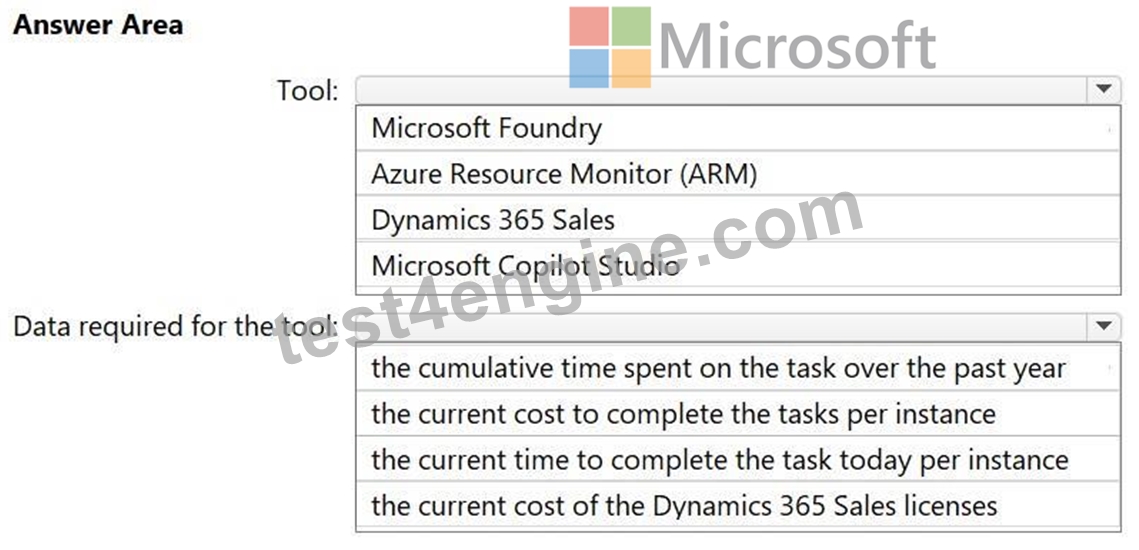
Answer:
Explanation: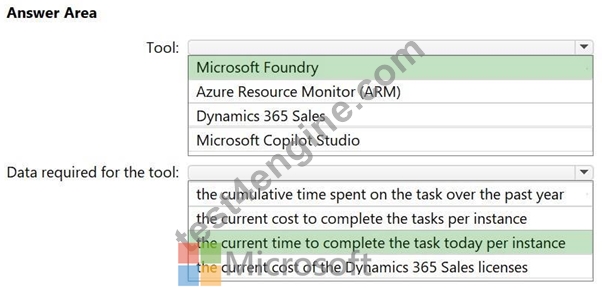
Explanation:
Scenario:
The return on investment (ROI) of switching from the current process to the future process is required for stakeholder sign off.
Box 1: Microsoft Foundry
Tool
To secure stakeholder sign-off for a Microsoft AI solution using AI agents and Dataverse, Azure AI Foundry (formerly Azure AI Studio) provides a structured framework to gather metrics across five key "ROI levers":
1. Identify Key ROI Metrics via Foundry
Use the Foundry ROI Framework to categorize and collect data that compares the current manual process to the future AI-driven state.
2. Gather Data using Foundry Tools
Foundry offers specific technical features to generate the evidence needed for your business case.
3. Calculate the ROI
Once metrics are gathered, apply the standard Microsoft-recommended formula for the business case.
Box 2: the current time to complete the task today per instance
Data required for the tool
In the Microsoft Foundry ROI framework, the metric for current time required to complete a task today is typically referred to as the Current Time per Instance or Task Duration (Baseline). This value serves as the primary "Before" benchmark to calculate the efficiency gains of the new AI agent solution.
Reference:
https://itnext.io/stop-wasting-tokens-how-to-design-high-roi-ai-apps-on-microsoft-foundry-
616622ddead6
https://techcommunity.microsoft.com/blog/azure-ai-foundry-blog/a-framework-for-calculating-roi- for-agentic-ai-apps/4369169
NEW QUESTION # 33
......
AB-100 Real Valid Brain Dumps With 67 Questions: https://www.test4engine.com/AB-100_exam-latest-braindumps.html