


[Oct-2025] The Best NSE 7 Network Security Architect Study Guide for the NSE7_EFW-7.2 Exam
NSE7_EFW-7.2 certification guide Q&A from Training Expert Test4Engine
Fortinet NSE7_EFW-7.2 Exam Syllabus Topics:
| Topic | Details |
|---|---|
| Topic 1 |
|
| Topic 2 |
|
| Topic 3 |
|
| Topic 4 |
|
| Topic 5 |
|
NEW QUESTION # 26
Refer to the exhibit, which contains a partial OSPF configuration.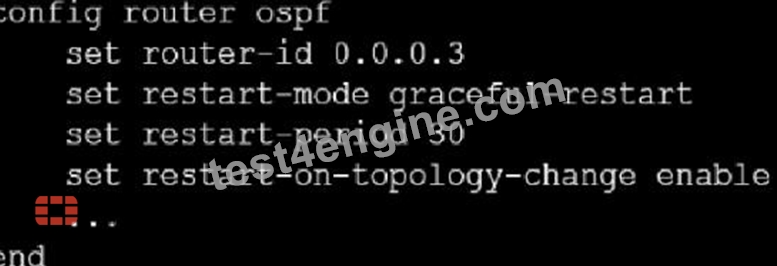
What can you conclude from this output?
- A. The router sends grace LSAs before it restarts.
- B. FortiGate restarts if the topology changes.
- C. Neighbors maintain communication with the restarting router.
- D. The restarting router sends gratuitous ARP for 30 seconds.
Answer: A
Explanation:
From the partial OSPF (Open Shortest Path First) configuration output:
The router sends grace LSAs before it restarts: This is implied by the command 'set restart-mode graceful-restart'. When OSPF is configured with graceful restart, the router sends grace LSAs (Link State Advertisements) to inform its neighbors that it is restarting, allowing for a seamless transition without recalculating routes.
Fortinet documentation on OSPF configuration clearly states that enabling graceful restart mode allows the router to maintain its adjacencies and routes during a brief restart period.
NEW QUESTION # 27
Refer to the exhibit, which shows an SSL certification inspection configuration.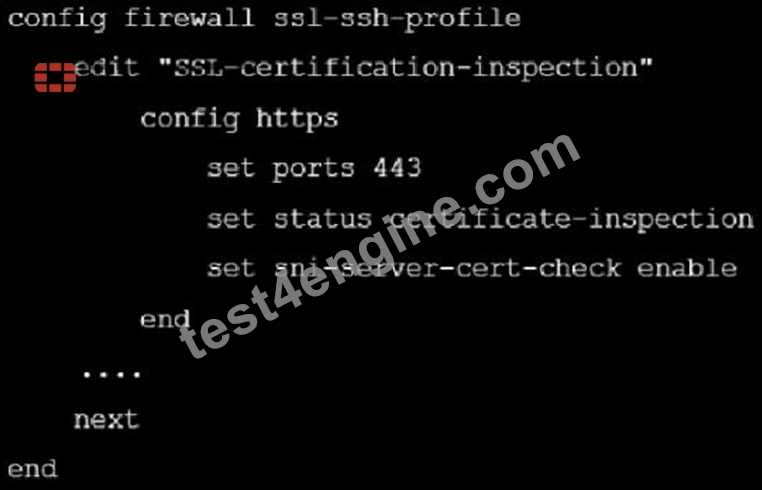
Which action does FortiGate take if the server name indication (SNI) does not match either the common name (CN) or any of the subject alternative names (SAN) in the server certificate?
- A. FortiGate closes the connection because this represents an invalid SSL/TLS configuration
- B. FortiGate uses the CN information from the Subject field in the server certificate
- C. FortiGate uses the SNI from the user's web browser.
- D. FortiGate uses the first entry listed in the SAN field in the server certificate
Answer: B
Explanation:
If the domain in the SNI field does not match any of the domains listed in the CN and SAN fields, FortiGate uses the domain in the CN field instead of the domain in the SNI field.
NEW QUESTION # 28
You are testing the implementation of a new custom remote desktop application in your network In which two ways can you eliminate false positives in IPS during this testing phase? (Choose two)
- A. Permanently bypass the affected endpoints
- B. Create an IP address exception
- C. Adjust the rate-based signature threshold and its duration.
- D. Enable the preserve source pore option in the firewall policy
Answer: A,C
NEW QUESTION # 29
You contoured an address object on the tool fortiGate in a Security Fabric. This object is not synchronized with a downstream device. Which two reasons could be the cause? (Choose two)
- A. The root FortiGate has configuration-sync set to enable
- B. The downstream FortiGate has configuration-sync set to local
- C. The downstream TortiGate has fabric-object-unification set to local
- D. The address object on the root FortiGate has fabric-object set to disable
Answer: B,D
Explanation:
Option A is correct because if the address object on the root FortiGate has fabric-object set to disable, it will not be synchronized.
Option D is correct because if the downstream FortiGate has configuration-sync set to local, it will not accept the synchronized configuration from the root FortiGate.
NEW QUESTION # 30
Refer to the exhibits, which contain the network topology and BGP configuration for a hub.
Exhibit A.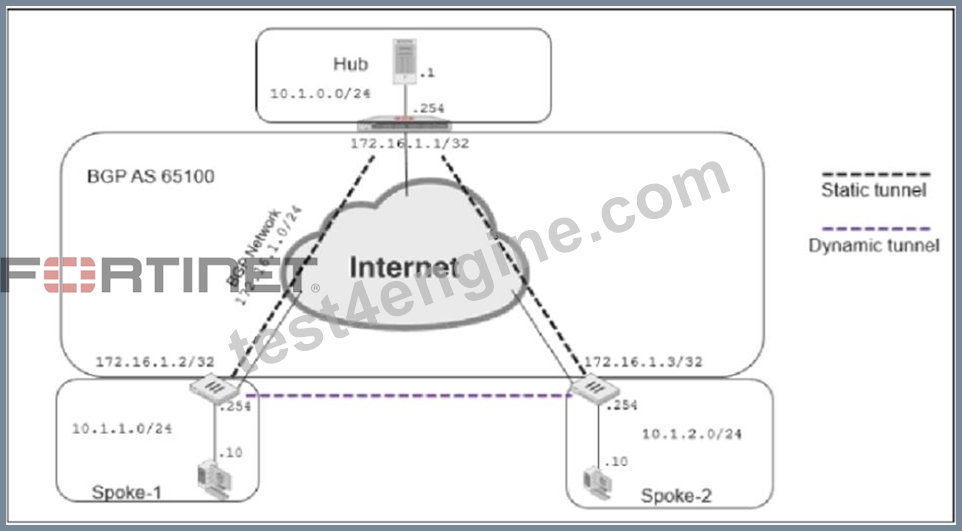
Exhibit B.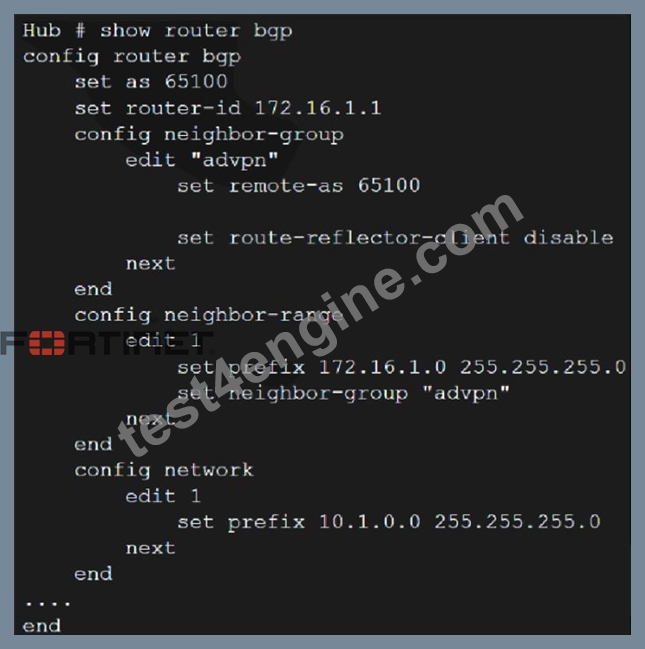
An administrator is trying to configure ADVPN with a hub and spoke VPN setup using iBGP. All the VPNs are up and connected to the hub. The hub is receiving route information from both spokes over iBGP; however the spokes are not receiving route information from each other.
What change must the administrator make to the hub BGP configuration so that the routes learned from one spoke are forwarded to the other spoke?
- A. Configure auto-discovery-sender on the hub
- B. Configure the hub as a route reflector
- C. Enable route redistribution under config router bgp
- D. Add a prefix list to the hub that permits routes to be shared between the spokes
Answer: A
NEW QUESTION # 31
Refer to the exhibit, which shows a network diagram.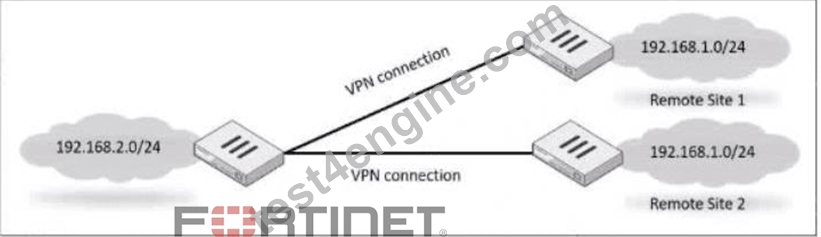
Which IPsec phase 2 configuration should you impalement so that only one remote site is connected at any time?
- A. Set route-overlap to either use-new or use-old
- B. Set single-source to enable
- C. Set net-device to enable
- D. Set route-overlap to allow.
Answer: A
Explanation:
To ensure that only one remote site is connected at any given time in an IPsec VPN scenario, you should use route-overlap with the option to either use-new or use-old. This setting dictates which routes are preferred and how overlaps in routes are handled, allowing for one connection to take precedence over the other (C).
NEW QUESTION # 32
Refer to the exhibit, which shows a routing table.
What two options can you configure in OSPF to block the advertisement of the 10.1.10.0 prefix? (Choose two.)
- A. Configure a route-map out
- B. Configure a distribute-list-out
- C. Remove the 16.1.10.C prefix from the OSPF network
- D. Disable Redistribute Connected
Answer: A,B
Explanation:
To block the advertisement of the 10.1.10.0 prefix in OSPF, you can configure a distribute-list-out or a route- map out. A distribute-list-out is used to filter outgoing routing updates from being advertised to OSPF neighbors1. A route-map out can also be used for filtering and is applied to outbound routing updates2. References := Technical Tip: Inbound route filtering in OSPF usi ... - Fortinet Community, OSPF | FortiGate / FortiOS 7.2.2 - Fortinet Documentation
NEW QUESTION # 33
After enabling IPS, you receive feedback about traffic being dropped.
What could be the reason?
- A. IPS is configured to monitor.
- B. np-accel-node is set to enable.
- C. traffic-submit is set to disable.
- D. fail-open is set to disable.
Answer: D
Explanation:
Fail-open is a feature that allows traffic to pass through the IPS sensor without inspection when the sensor fails or is overloaded. If fail-open is set to disable, traffic will be dropped in such scenarios.
NEW QUESTION # 34
Refer to the exhibit, which shows an ADVPN network.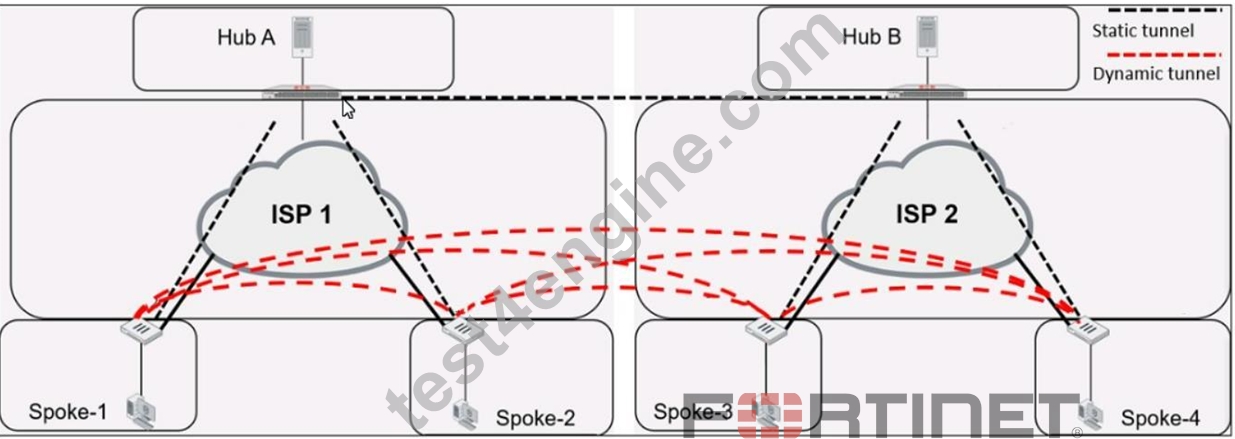
Which VPN phase 1 parameters must you configure on the hub for the ADVPN feature to function? (Choose two.)
- A. set auto-discovery-sender enable
- B. set add-route enable
- C. set auto-discovery-forwarder enable
- D. set auto-discovery-receiver enable
Answer: C,D
Explanation:
For the ADVPN feature to function properly on the hub, the following phase 1 parameters must be configured:
A: set auto-discovery-forwarder enable: This enables the hub to forward shortcut information to the spokes, which is essential for them to establish direct tunnels.
C: set auto-discovery-receiver enable: This allows the hub to receive shortcut offers from the spokes.
This information is corroborated by the Fortinet documentation, which explains that in an ADVPN setup, the hub must be able to both forward and receive shortcut information for dynamic tunnel creation between spokes.
NEW QUESTION # 35
Refer to the exhibit, which shows a network diagram.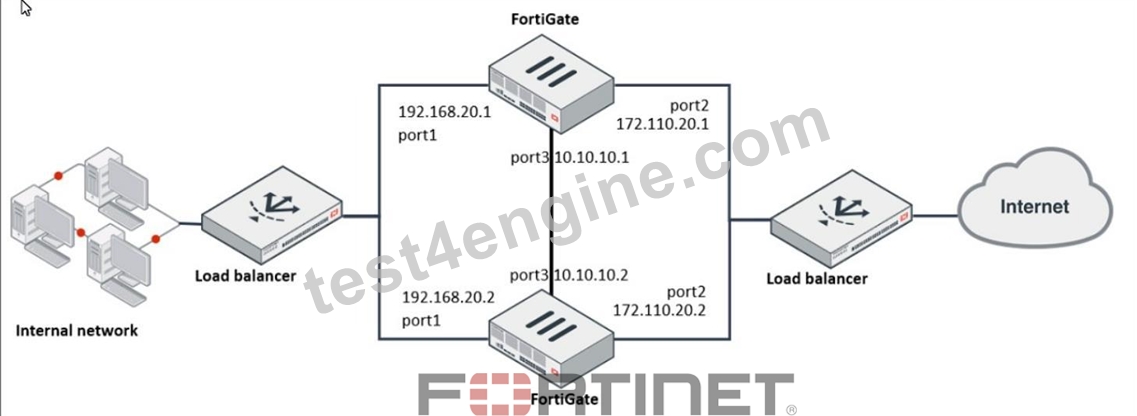
Which protocol should you use to configure the FortiGate cluster?
- A. FGCP in active-active mode
- B. VRRP
- C. FGSP
- D. FGCP in active-passive mode
Answer: C
Explanation:
Given the network diagram and the presence of two FortiGate devices, the Fortinet Gate Clustering Protocol (FGCP) in active-passive mode is the most appropriate for setting up a FortiGate cluster. FGCP supports high availability configurations and is designed to allow one FortiGate to seamlessly take over if the other fails, providing continuous network availability. This is supported by Fortinet documentation for high availability configurations using FGCP.
NEW QUESTION # 36
An administrator is configuring two FortiGate devices in an HA cluster. While configuring the devices, the administrator issues the following commands on both HA cluster members:
In which two ways do these commands impact the HA cluster? (Choose two.)
- A. They force the switches to update their MAC forwarding tables, when failover happens.
- B. They force both HA devices for remote link monitoring to detect an issue in the forwarding path.
- C. They force the former primary to send gratuitous ARP packets when the failover happens to indicate that the virtual MAC address is now using a different device.
- D. They force the former primary to shut down all ts interfaces for one second when failover happens, excluding the heartbeat and reserved management interfaces.
Answer: C,D
NEW QUESTION # 37
Refer to the exhibit, which shows config system central-management information.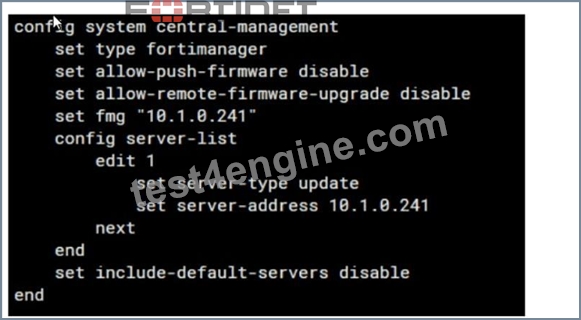
Which setting must you configure for the web filtering feature to function?
- A. Configure securewf.fortiguard. net on the default servers.
- B. Add server. fortiguard. net to the server list.
- C. Set update-server-location to automatic.
- D. Configure server-type with the rating option.
Answer: D
Explanation:
For the web filtering feature to function effectively, the FortiGate device needs to have a server configured for rating services. The rating option in the server-type setting specifies that the server is used for URL rating lookup, which is essential for web filtering. The displayed configuration does not list any FortiGuard web filtering servers, which would be necessary for web filtering. The setting set include-default-servers disable indicates that the default FortiGuard servers are not being used, and hence, a specific server for web filtering (like securewf.fortiguard.net) needs to be configured.
NEW QUESTION # 38
Refer to the exhibit.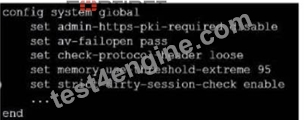
which contains a partial configuration of the global system. What can you conclude from this output?
- A. NPs and CPs arc disabled
- B. Only NPs are disabled
- C. NPs and CPs are enabled
- D. Only CPs arc disabled
Answer: A
Explanation:
The configuration output shows various global settings for a FortiGate device. The terms NP (Network Processor) and CP (Content Processor) relate to FortiGate's hardware acceleration features. However, the provided configuration output does not directly mention the status (enabled or disabled) of NPs and CPs.
Typically, the command to disable or enable hardware acceleration features would specifically mention NP or CP in the command syntax. Therefore, based on the output provided, we cannot conclusively determine the status of NPs and CPs, hence option D is the closest answer since the output does not confirm that they are enabled.
References:
* FortiOS Handbook - CLI Reference for FortiOS 5.2
NEW QUESTION # 39
Exhibit.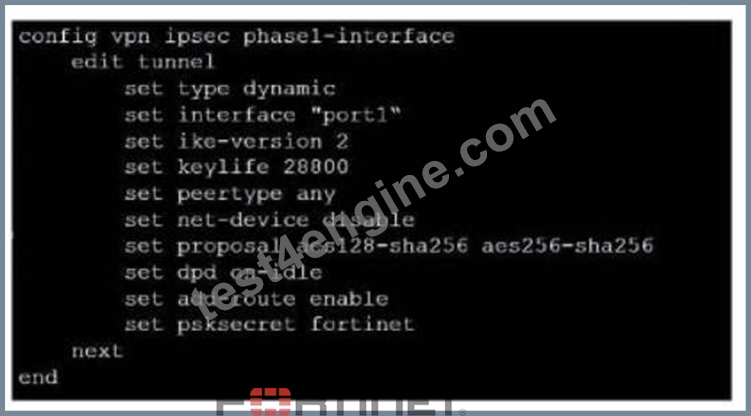
Refer to the exhibit, which contains a partial VPN configuration.
What can you conclude from this configuration1?
- A. The VPN should use the dynamic routing protocol to exchange routing information Through the tunnels.
- B. FortiGate creates separate virtual interfaces for each dial up client.
- C. Dead peer detection s disabled.
- D. The routing table shows a single IPSec virtual interface.
Answer: D
Explanation:
The configuration line "set dpd on-idle" indicates that dead peer detection (DPD) is set to trigger only when the tunnel is idle, not actively disabled1. References: FortiGate IPSec VPN User Guide - Fortinet Document Library From the given VPN configuration, dead peer detection (DPD) is set to 'on-idle', indicating that DPD is enabled and will be used to detect if the other end of the VPN tunnel is still alive when no traffic is detected.
Hence, option C is incorrect. The configuration shows the tunnel set to type 'dynamic', which does not create separate virtual interfaces for each dial-up client (A), and it is not specified that dynamic routing will be used (B). Since this is a phase 1 configuration snippet, the routing table aspect (D) cannot be concluded from this alone.
NEW QUESTION # 40
Refer to the exhibit, which contains a TCL script configuration on FortiManager.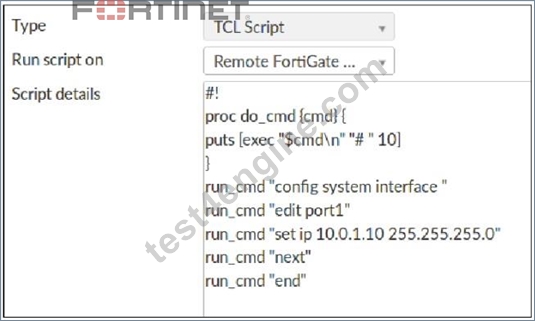
An administrator has configured the TCL script on FortiManager, but the TCL script failed to apply any changes to the managed device after being run.
Why did the TCL script fail to make any changes to the managed device?
- A. The TCL script must start with #include.
- B. There is no corresponding #! to signify the end of the script.
- C. The TCL procedure run_cmd has not been created.
- D. The TCL procedure lacks the required loop statements to iterate through the changes.
Answer: C
NEW QUESTION # 41
Refer to the exhibits, which show the configurations of two address objects from the same FortiGate.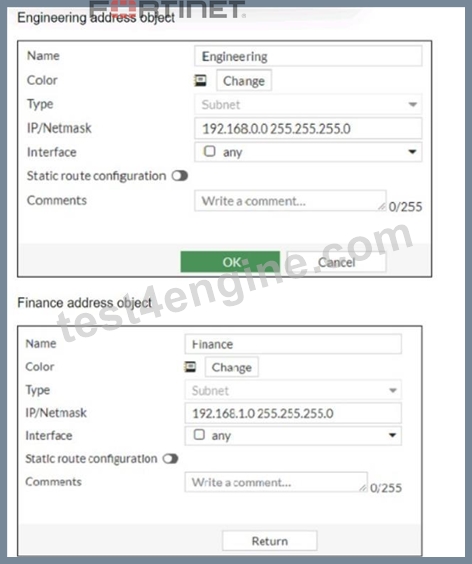
Why can you modify the Engineering address object, but not the Finance address object?
- A. FortiGate is registered on FortiManager.
- B. You have read-only access.
- C. FortiGate joined the Security Fabric and the Finance address object was configured on the root FortiGate.
- D. Another user is editing the Finance address object in workspace mode.
Answer: D
Explanation:
The inability to modify the Finance address object while being able to modify the Engineering address object suggests that the Finance object is being managed by a higher authority in the Security Fabric, likely the root FortiGate. When a FortiGate is part of a Security Fabric, address objects and other configurations may be managed centrally. This aligns with the Fortinet FortiGate documentation on Security Fabric and central management of address objects.
NEW QUESTION # 42
Which configuration can be used to reduce the number of BGP sessions in on IBGP network?
- A. Route-reflector-server enable
- B. Route-reflector-client enable
- C. Route-reflector-peer enable
- D. Route-reflector enable
Answer: B
Explanation:
To reduce the number of BGP sessions in an IBGP network, you can use a route reflector, which acts as a focal point for IBGP sessions and readvertises the prefixes to all other peers. To configure a route reflector, you need to enable the route-reflector-client option on the neighbor-group settings of the hub device. This will make the hub device act as a route reflector server and the other devices as route reflector clients. References :
= Route exchange | FortiGate / FortiOS 7.2.0 - Fortinet Documentation
NEW QUESTION # 43
Refer to the exhibit, which contains a TCL script configuration on FortiManager.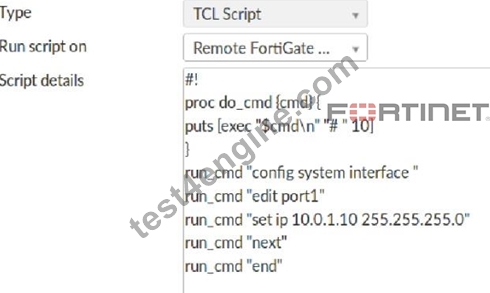
An administrator has configured the TCL script on FortiManager, but the TCL script failed to apply any changes to the managed device after being run.
Why did the TCL script fail to make any changes to the managed device?
- A. The TCL script must start with #include.
- B. There is no corresponding #! to signify the end of the script.
- C. The TCL procedure run_cmd has not been created.
- D. The TCL procedure lacks the required loop statements to iterate through the changes.
Answer: C
NEW QUESTION # 44
Which two statements about the neighbor-group command are true? (Choose two.)
- A. It applies common settings in an OSPF area.
- B. You can apply it in Internal BGP (IBGP) and External BGP (EBGP).
- C. You can configure it on the GUI.
- D. It is combined with the neighbor-range parameter.
Answer: A,B
Explanation:
The neighbor-group command in FortiOS allows for the application of common settings to a group of neighbors in OSPF, and can also be used to simplify configuration by applyingcommon settings to both IBGP and EBGP neighbors. This grouping functionality is a part of the FortiOS CLI and is documented in the Fortinet CLI reference.
NEW QUESTION # 45
......
The Best Fortinet NSE7_EFW-7.2 Study Guides and Dumps of 2025: https://www.test4engine.com/NSE7_EFW-7.2_exam-latest-braindumps.html
NSE7_EFW-7.2 Certification Overview Latest NSE7_EFW-7.2 PDF Dumps: https://drive.google.com/open?id=1N07ZP9-QjQcDLjizOwZbF-wxmdMphSn8