


TDS-C01 Exam Dumps Free Test Engine Verified By Tableau Desktop Specialist Certified Experts
Use Real Tableau Achieve the TDS-C01 Dumps - 100% Exam Passing Guarantee
Tableau TDS-C01 exam measures the candidate's ability to use Tableau Desktop to connect to data sources, create data visualizations, and share insights with others. TDS-C01 exam consists of 36 multiple-choice questions that are designed to test the candidate's knowledge and understanding of Tableau Desktop. TDS-C01 exam is timed, and candidates have 120 minutes to complete the exam. The passing score for the exam is 75%, and candidates who pass the exam are awarded the Tableau Desktop Specialist certification.
Tableau TDS-C01 certification exam is ideal for professionals who want to enhance their resumes with a recognized certification that demonstrates their ability to work with data visualization tools. Tableau Desktop Specialist certification can help individuals increase their job prospects, negotiate higher salaries, and demonstrate their commitment to professional development. Additionally, Tableau certification holders can join the Tableau community, where they can network with other professionals, access exclusive resources, and participate in Tableau events.
NEW QUESTION # 47
Which of the following are the options to export the data used to build the view / visualisations?
- A. JSON format
- B. MS Access Database
- C. PDF File
- D. CSV file
Answer: B
Explanation:
Explanation
You can export the data in a Tableau data source, including all or part of the records from your original data.
Alternatively, you can export only the portion of data used to generate the view.
Since the question mentions the data used to build the view, we'll focus on that :
*Export data in the view to Microsoft Access or .csv*
Export the data that is used to generate the view as an Access database (Windows only) or .csv file (Mac only).
1) In Tableau Desktop, select Worksheet > Export > Data.
2) Select a location and type a name for your Access database or .csv file.
3) Click Save.
4) If you're on Windows, the Export Data to Access dialog box displays to give you the option to immediately use the new Access database and continue working in Access without interrupting your work flow.
NEW QUESTION # 48
A field that shows average home values for the United States in 2016 is most likely :
- A. A continuous date value dimension
- B. An aggregated measure
- C. A geographical dimension
- D. A discrete date part dimension
Answer: B
Explanation:
Explanation
This question is directly from the Official Tableau Desktop Specialist exam guide.
Since we are talking about the AVERAGE home values for the United States in 2016, the question is directly offering us a hint that the answer has something to do with aggregation and that too the values tell us that we're working with MEASURES.
Date part and Date values don't really make much sense given the question, and neither does geography.
Therefore, the answer naturally is "An aggregated measure".
NEW QUESTION # 49
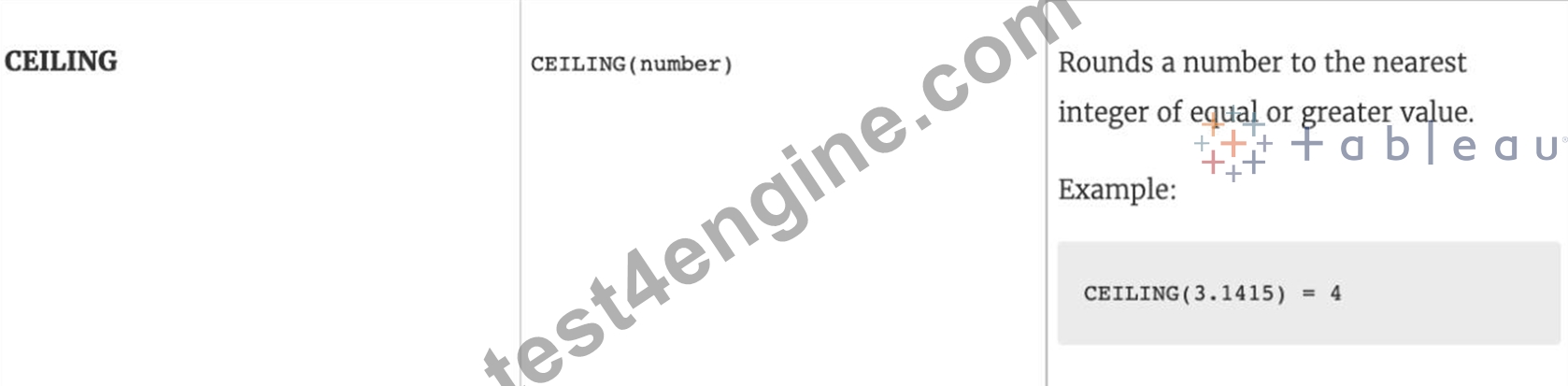
Which of the following returns the Absolute Value of a given number?
- A. ZN(Number)
- B. CEILING(Number)
- C. ABS(Number)
- D. FLOOR(Number)
Answer: C
Explanation:
Explanation
From the official Tableau website:


NEW QUESTION # 50
The row and column shelves contain ___________________
- A. Parameters
- B. Filters
- C. Grand Totals
- D. Pills
Answer: D
Explanation:
We can drag fields from the Data pane to create the structure for your visualizations.
The Columns shelf creates the columns of a table, while the Rows shelf creates the rows of a table. You can place any number of fields on these shelves.
These FIELDS are also referred to as PILLS. See below:
NEW QUESTION # 51
Download the Dataset from:
https://drive.google.com/file/d/12AYHfiPWkwBmvH0zbumOURgUX6Az00Rw/view?usp=sharing Using the Time Series Table, create a line chart to show Sales over time. Which Month and Year witnessed the lowest Sales?
- A. January 2018
- B. March 2018
- C. September 2017
- D. December 2017
Answer: A
Explanation:
Explanation
Follow the steps to get the correct answer : January 2018
* We are talking about dates, so use the Time series sheet as follows:
* Next, the following should be your view and clearly, January 2018 is the lowest point:
Read more about dates:
https://interworks.com/blog/rcurtis/2017/01/30/tableau-deep-dive-dates-introduction-dates/
NEW QUESTION # 52
What term is used to describe the following picture?
- A. Parameter
- B. Set
- C. Hierarchy
- D. Group
- E. Larger image
Answer: B
Explanation:
When you connect to a data source, Tableau automatically separates date fields into hierarchies so you can easily break down the viz. You can also create your own custom hierarchies. For example, if you have a set of fields named Region, State, and County, you can create a hierarchy from these fields so that you can quickly drill down between levels in the viz.
NEW QUESTION # 53
Using the Time Series table, create a cross-tab showing sales for each Assortment broken down by Year and Quarter. In Q4 of October 2017, what was the Average sales amount for the Hardware assortment?
- A. 112,256
- B. 1,461
- C. 111,060
- D. 1,222
Answer: A
Explanation:
If you chose 111,060 you were SO close to the correct answer but made a small mistake - you didn't change the aggregation to AVERAGE! This is one of the common mistakes many test takers make, so keep this in mind.
To reach the correct answer, follow the steps below:
1) Draw Assortment to the Column shelf, and drag Year to the Rows Shelf. Then Drill down further on Year to accomodate Quarters and Months as well!
Although this seems enough, DON'T FORGET to change the aggregation like in the next step, which will completely change the values!

The correct answer as you can see is 1,461 - Sales for Harware Assortment in 2017 Q4, October
NEW QUESTION # 54
Which one of the following is a dimension?
- A. Longitude
- B. Number of records
- C. Measure Names
- D. Latitude
Answer: C
Explanation:
Explanation
Measure Names is a dimension. Latitude, Longitude, and Number of records are all measures.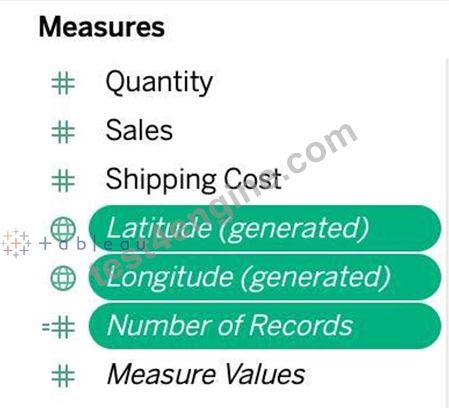

NEW QUESTION # 55
Which of the following is an example of a Date Part?
- A. March 2019
- B. Q4 2017
- C. November
- D. September 2020
Answer: C
Explanation:
All answers except November are examples of Date Values (continuous in nature).
See below:
You can see that the option in Green symbolizes our correct answer, i.e only a Month. In our case that month is November (the correct answer).
All other options are combinations of a year with one other value (like a month, quarter, or day). So this is how by looking at an option you can know if its a date part or date value!
NEW QUESTION # 56
Larger image
What is this entire view referred to as in Tableau?
- A. Distribution Pane
- B. Data pane
- C. Summary Pane
- D. Analytics Pane
Answer: D
Explanation:
Distribution Pane
Explanation:
This is the Analytics pane! Read more from the official documentation below:
NEW QUESTION # 57
Broadly speaking, when users connect to Tableau, the data fields in their data set are automatically assigned a ____________ and a ____________.
- A. role, type
- B. type, role
- C. dimension, measure
- D. Data type, Value
Answer: A
Explanation:
When users connect to Tableau, the data fields in their data set are automatically assigned a role and a type.
Role can be of the following two types:
1) Dimension
2) Measure
Type can be of the following :
1) String
2) Number
3) Geographic
4) Boolean
5) Date
6) Date and Time
NEW QUESTION # 58
Which of the following would you use to connect to multiple tables in a single data source at once?
- A. A Blend
- B. A Set
- C. A Join
- D. A Hierarchy
Answer: C
Explanation:
The data that you analyze in Tableau is often made up of a collection of tables that are related by specific fields (that is, columns). Joining is a method for combining data on based on those common fields. The result of combining data using a join is a virtual table that is typically extended horizontally by adding columns of data.
For example, consider the following two tables originating from a single data source:
We can combine these 2 tables, simply by joining the tables on ID to answer questions like, "How much was paid in royalties for authors from a given publisher?". By combining tables using a join, you can view and use related data from different tables in your analysis.
NEW QUESTION # 59
DOWNLOAD THE DATASET FROM: https://drive.google.com/drive/folders/1WXzqsrNmXVdmQ-574wld4InEplyKT8RP?usp=sharing (if you haven't already) Using the cwurData table, plot a Map to see which country had the Second highest number of patents in the Year 2013?
- A. United States
- B. France
- C. United Kingdom
- D. Canada
Answer: B
Explanation:
Follow along to get the correct answer:
Drag Country to the view, and then Patents to the Size Mark on the Marks shelf as follows :
2) But, this isn't all right? We need to focus on the year 2013. This can be done by using the year column as it is (continuous) in the filter shelf, or by converting it to discrete first and then using it:
2.1 As it is (continuous)
2.2 Converting to discrete first & then using it
and then :
3) We can now see that France, with 485 has the 2nd most number of patents for the year 2013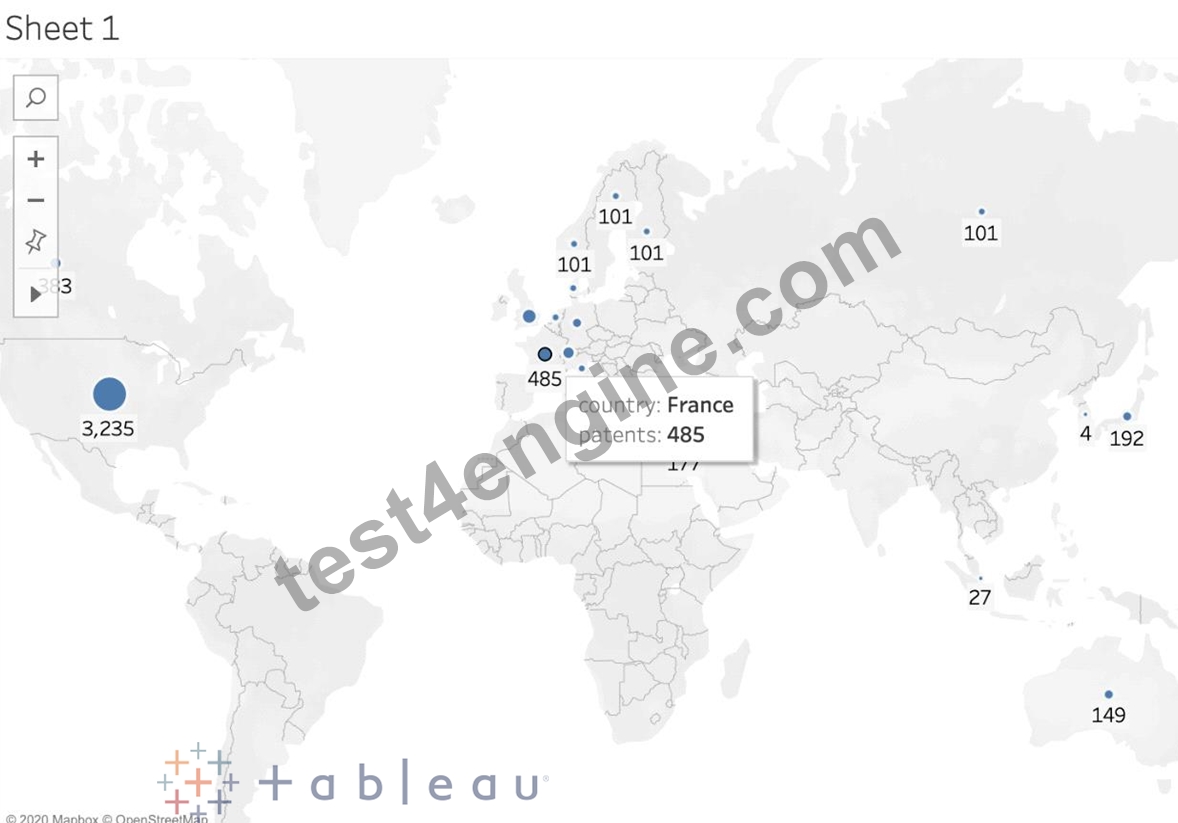
NEW QUESTION # 60
_____________ contains the visualisations, info needed to build the visualisations, and a copy of the data source.
- A. Tableau Workbook (.twb)
- B. Tableau Data Extract (.tde)
- C. Tableau Bookmark (.tbm)
- D. Tableau Packaged Workbook (.twbx)
Answer: D
Explanation:
Explanation
TWBX is all in one. It contains viz, info needed to build the viz, and a copy of the data source. It doesn't contain extracts of the data but can contain both live and data extracts. Best if want to eliminate the barrier of data access.
Create a .twbx with file-based data sources
1) Select File > Save As.
2) Specify a file name for the packaged workbook in the Save As dialog box.
3)Select Tableau Packaged Workbooks on the Save as type drop-down list.
4) Click Save.
5) The default location is the Workbooks folder of the Tableau repository. However, you can save packaged workbooks to any directory you choose.
The following files are included in packaged workbooks:
--> Background images
--> Custom geocoding
--> Custom shapes
--> Local cube files
--> Microsoft Access files
--> Microsoft Excel files
--> Tableau extract files (.hyper or .tde)
--> Text files (.csv, .txt, etc.)
NEW QUESTION # 61
How can you change the Default Aggregation for a measure in Tableau?
- A. By right clicking the measure -> Default properties and choosing Aggregation
- B. By double clicking on the measure, and then choosing Window -> Default Aggregation
- C. By right clicking the dimension -> Default properties and choosing Aggregation
- D. By changing its properties manually every time we need to use it
Answer: A
Explanation:
According to the official Tableau documentation:
Dimensions don't have aggregation properties, and adding properties manually each time defeats the whole DEFAULT aggregation purpose. Window tab doesn't have any default aggregation option!
NEW QUESTION # 62
By definition, Tableau displays measures over time as a ____________
- A. Bar
- B. Packed Bubble
- C. Line
- D. Stacked Bar
Answer: C
Explanation:
Line charts connect individual data points in a view. They provide a simple way to visualize a sequence of values and are useful when you want to see trends over time, or to forecast future values.
Please refer to the images below:

NEW QUESTION # 63
Which of the following returns the Absolute Value of a given number?
- A. ZN(Number)
- B. CEILING(Number)
- C. ABS(Number)
- D. FLOOR(Number)
Answer: C
Explanation:
From the official Tableau website:


NEW QUESTION # 64
Which of the following are the options to export the data used to build the view / visualisations?
- A. JSON format
- B. CSV file
- C. MS Access Database
- D. PDF File
Answer: B,C
Explanation:
You can export the data in a Tableau data source, including all or part of the records from your original data. Alternatively, you can export only the portion of data used to generate the view.
Since the question mentions the data used to build the view, we'll focus on that :
*Export data in the view to Microsoft Access or .csv*
Export the data that is used to generate the view as an Access database (Windows only) or .csv file (Mac only).
1) In Tableau Desktop, select Worksheet > Export > Data.
2) Select a location and type a name for your Access database or .csv file.
3) Click Save.
4) If you're on Windows, the Export Data to Access dialog box displays to give you the option to immediately use the new Access database and continue working in Access without interrupting your work flow.
NEW QUESTION # 65
When you drop a continuous field on Color, Tableau displays a quantitative legend with a ___________ range of colors.
- A. Mixed
- B. Discrete
- C. Fading
- D. Continuous
Answer: D
Explanation:
When you drop a discrete field on Color in the Marks card, Tableau displays a categorical palette and assigns a color to each value of the field.
When you drop a continuous field on Color, Tableau displays a quantitative legend with a continuous range of colors.
Web version:
Desktop Version:
For more information about color palettes, see Color Palettes and Effects.
NEW QUESTION # 66
Which of the following is NOT a valid official data source in Tableau Desktop?
- A. PostgreSQL
- B. Amazon Redshift
- C. SAP HANA
- D. Google Firebase
Answer: B
Explanation:
Explanation
Presently, there is no official way to connect your data in Firebase directly with Tableau Desktop.
A workaround however can be to export your Firebase data into Google BigQuery, and then connect it to Tableau Desktop.
But then again, it is a workaround and not an official out-of-the-box solution.
The following are the available Data sources available as of now:
* Server
* File
NEW QUESTION # 67
______________ refers to the level of detail for a piece of data, wherever you are looking.
- A. Data connectivity
- B. Data granularity
- C. Data LOD
- D. Data Cleanliness
Answer: B
Explanation:
Explanation
Data is generated and analyzed at many different levels of granularity. Granularity is the level of detail of the data. For example, when looking at graduation data, granularity would describe whether a row in the data set represents a single person or the graduating class of a university.
NEW QUESTION # 68
When should you use a relationship instead of a join for two data sets?
- A. The data sets include similar data aggregated up to the highest level.
- B. The data sets are in two separate tables within a single spreadsheet.
- C. To use both data sets across multiple sheets in a visualization.
- D. The data sets include similar data aggregated at different levels of detail.
Answer: D
Explanation:
You should use a relationship instead of a join for two data sets when the data sets include similar data aggregated at different levels of detail. A relationship is a way of combining data from different tables based on common fields without creating a single table with all fields. A relationship allows you to query data from multiple tables as needed and preserve the level of detail of each table. A relationship is useful when you have data sets that are aggregated at different levels of detail, such as sales by region and sales by product. A relationship can match data from different levels of detail without creating null values or duplicate rows. The other options are not valid situations for using a relationship instead of a join for two data sets. The data sets include similar data aggregated up to the highest level is not correct, because a relationship is not needed when both data sets have the same level of detail. You can use either a relationship or a join in this case, depending on your preference and performance. The data sets are in two separate tables within a single spreadsheet is not correct, because a relationship is not limited by the location or format of the data sets. You can use a relationship to combine data from different sources or connections, such as databases, files, or web services. To use both data sets across multiple sheets in a visualization is not correct, because a relationship does not affect how you use data in your visualization. You can use either a relationship or a join to create multiple sheets and dashboards with your data sets.
NEW QUESTION # 69
When working with Excel, text file data, JSON file, .pdf file data, you can use _________________ to union files across folders, and worksheets across workbooks. Search is scoped to the selected connection.
- A. Pattern Search
- B. Wildcard Search
- C. Union Search
- D. Regex Search
Answer: B
Explanation:
You can use Wildcard Search to set up search criteria to automatically include tables in your union. Use the wildcard character, which is an asterisk (*), to match a sequence or pattern of characters in the Excel workbook and worksheet names, Google Sheets workbook and worksheet names, text file names, JSON file names, .pdf file names, and database table names.
When working with Excel, text file data, JSON file, .pdf file data, you can also use this method to union files across folders, and worksheets across workbooks. Search is scoped to the selected connection. The connection and the tables available in a connection are shown on the left pane of the Data source page.

NEW QUESTION # 70
......
Tableau TDS-C01 (Tableau Desktop Specialist) Exam is a certification exam designed to test the skills and knowledge of individuals who use Tableau for data analysis and visualization. TDS-C01 exam is the first step in the Tableau certification journey and is ideal for anyone who wants to demonstrate their proficiency in using Tableau Desktop. TDS-C01 exam covers a range of topics such as connecting to data sources, creating basic calculations, creating visualizations and sharing insights with others.
Check the Free demo of our TDS-C01 Exam Dumps with 270 Questions: https://www.test4engine.com/TDS-C01_exam-latest-braindumps.html
Verified TDS-C01 Q&As - Pass Guarantee TDS-C01 Exam Dumps: https://drive.google.com/open?id=1bDT42jfVaucmrHy-AdyFAfjQEIchLsgT