


Microsoft MS-102日本語 Exam Syllabus Topics:
| Topic | Details |
|---|---|
| Topic 1 |
|
| Topic 2 |
|
| Topic 3 |
|
| Topic 4 |
|
Reference: https://learn.microsoft.com/en-us/certifications/exams/ms-102
You choose to apply for Microsoft Microsoft 365 Certified because you know the society is full of competition and challenges. If you do not want Microsoft 365 Administrator (MS-102日本語版) exam to become your stumbling block, you should consider our Microsoft 365 Administrator (MS-102日本語版) test for engine or MS-102日本語 VCE test engine. Our Test4Engine is the leading position in this line and offer high-quality software test engine which can help you go through your examination. If you have no confidence for the Microsoft Microsoft 365 Administrator (MS-102日本語版) exam, our Microsoft 365 Administrator (MS-102日本語版) test for engine will be your best select.

We have three versions for each exam dumps that: PDF dumps, Soft test engine, and APP on-line test engine. Totally the APP on-line test for engine is the most popular. Most candidates think about MS-102日本語 test for engine or Microsoft 365 Administrator (MS-102日本語版) VCE test engine, they will choose APP on-line test engine in the end. The APP on-line test engine has many functions below.
1. Microsoft 365 Administrator (MS-102日本語版) APP on-line test engine includes the exam practice questions and answers. You can practice whenever you want. MS-102日本語 VCE test engine includes 80% or so questions & answers of the real test. It is the foundation for passing exam. Of course, the PDF dumps & Soft test engine also have this function. (Microsoft 365 Administrator (MS-102日本語版) test for engine)
2. Microsoft 365 Administrator (MS-102日本語版) APP on-line test engine can imitate the real test; it can set timed test, mark your performance and point out your mistakes. (MS-102日本語 test for engine) It is really like the real test. It is helpful for clearing up your nervousness before test. The soft test engine also has this function but the PDF dumps do not.(Microsoft 365 Administrator (MS-102日本語版) VCE test engine)
3. Microsoft 365 Administrator (MS-102日本語版) APP on-line test engine can be installed in all operate systems. You can download Microsoft 365 Administrator (MS-102日本語版) VCE test engine in your computers, iPhones, iWatch, MP4 or MP5 and so on. You can learn any time and any place you like. The soft test engine can just be installed in personal computers.
4. Statistically speaking, Microsoft 365 Administrator (MS-102日本語版) APP on-line test engine is also stable than the soft test engine. It is more powerful.
Besides, you may doubt about our service. Yes, we guarantee your money and information safety. We make sure that "No Pass, No Pay". Our Microsoft 365 Administrator (MS-102日本語版) test for engine can assist you go through the examination surely, meanwhile, our service will 100% satisfy you.
1. Our working time is 7*24, we will serve for you any time even on official holiday. You email or news about MS-102日本語 test for engine will be replied in 2 hours. Your questions & problems will be solved in 2 hours. After payment, you will receive our Microsoft 365 Administrator (MS-102日本語版) test for engine & Microsoft 365 Administrator (MS-102日本語版) VCE test engine soon.
2. We have professional IT staff who updates exam simulator engine every day so that all MS-102日本語 test for engine we sell out is latest & valid. Also we have a strict information system which can guarantee your information safety.
3. We support Credit Card payment so that your account and money will be safe certainly, you are totally worry-free shopping. We guarantee our Microsoft 365 Administrator (MS-102日本語版) test for engine will assist you go through the examination surely. If you fail the exam unluckily we will refund you all the money you paid us unconditionally in one week. You get what you pay for.
More details please feel free to contact with us, we are pleased to serve for you. Give me a chance, I send you a success. Microsoft 365 Administrator (MS-102日本語版) test for engine & MS-102日本語 VCE test engine will indeed be the best helper for your Microsoft MS-102日本語 exam. If you choose us, you will 100% pass the exam for sure.
Microsoft 365 Administrator (MS-102日本語版) Sample Questions:
ホットスポット
あなたは、User1という名前のユーザーを含むMicrosoft 365 E5サブスクリプションを所有しています。
Microsoft Entra ID パスワード保護は、次の図に示すように構成されます。
ユーザー1は、以下のパスワードに更新しようとします。
ファルコン
プロジェクト22
T4il$pin45dg4
図に示された情報に基づいて、各記述を完成させる選択肢をドロップダウンメニューを使用して選択してください。
注:正解ごとに1ポイントが加算されます。
Correct Answer:

Explanation:
Box 1: Only T4il$pin45dg4
Box 2: can attempt to sign in immediately
Note: Manage Microsoft Entra ID smart lockout values
Based on your organizational requirements, you can customize the Microsoft Entra ID smart lockout values.
Customization of the smart lockout settings, with values specific to your organization, requires Microsoft Entra ID Premium P1 or higher licenses for your users. Customization of the smart lockout settings is not available for Azure China 21Vianet tenants.
To check or modify the smart lockout values for your organization, complete the following steps:
Sign in to the Entra portal.
Search for and select Microsoft Entra ID, then select Security > Authentication methods > Password protection.
Set th e Lockout threshold, based on how many failed sign-ins are allowed on an account before its first lockout.
The default is 10 for Azure Public tenants and 3 for Azure US Government tenants.
Set the Lockout duration in seconds, to the length in seconds of each lockout.
The default is 60 seconds (one minute).
If the first sign-in after a lockout period has expired also fails, the account locks out again. If an account locks repeatedly, the lockout duration increases.
Reference:
https://learn.microsoft.com /en-us/azure/active-directory/authentication/howto-password-smart-lockout
Microsoft 365 サブスクリプションをお持ちです。
Microsoft 365 管理センターから、次の図に示すように Microsoft 365 Apps 使用状況レポートを開きます。
レポートが次の要件を満たしていることを確認する必要があります。
* [ユーザー名] 列には、各ユーザーの実際の名前が表示される必要があります。
※ Microsoft Teams モバイル アプリの使用状況が表示される必要があります。
それぞれの要件に対して何を変更する必要がありますか?回答するには、回答領域で適切なオプションを選択してください。
注: 正しく選択するたびに 1 ポイントの価値があります。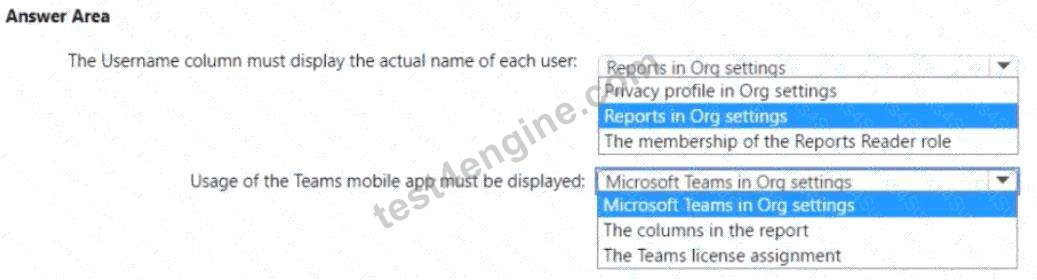
Correct Answer:

Explanation:
お客様のMicrosoft Entraテナントには、以下の表に示すユーザーが含まれています。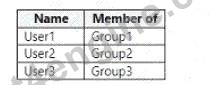
貴社では、Microsoft Defender for Endpoint を使用しています。Microsoft Defender for Endpoint には、次の表に示す役割が含まれています。
Microsoft Defender for Endpointには、次の表に示すデバイスグループが含まれています。
以下の各記述について、正しい場合は「はい」を選択してください。そうでない場合は「いいえ」を選択してください。
注:正解ごとに1ポイントが加算されます。
Correct Answer:

Explanation: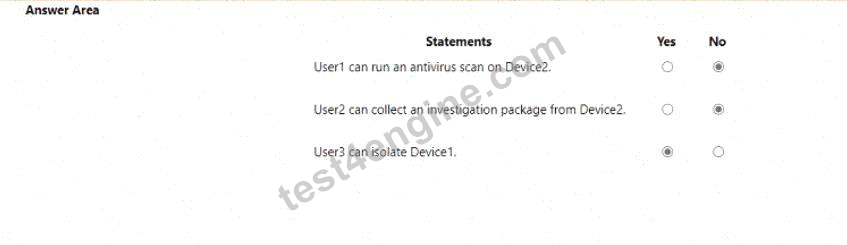
Microsoft 365 サブスクリプションをお持ちです。
データ損失防止 (DLP) ポリシーを構成します。
ユーザーが誤ってコンテンツを誤検知としてマークし、DLP ポリシーをバイパスしていることを発見しました。
ユーザーが DLP ポリシーをバイパスできないようにする必要があります。
何を設定すればよいでしょうか?
- A. インシデントレポート
- B. アクション
- C. 例外
- D. ユーザーによるオーバーライド
Correct Answer: D 🗳️
Explanation: Only visible for Test4Engine members. You can sign-up / login (it's free).
あなたはMicrosoft 365のサブスクリプションをお持ちです。User1という名前のユーザーが存在します。
Usedがすべてのメールボックスコンテンツに対して保留措置を講じることができることを確認する必要があります。
User1にはどのような権限を割り当てるべきですか?
- A. Exchange 管理センターのコンプライアンス管理ロール。
- B. Microsoft Entra ID 管理センターの情報保護管理者 IDE。
- C. Microsoft 365 管理センターのユーザー管理管理者ロール。
- D. Microsoft 365 コンプライアンス センターの eDiscovery Manager トート。
Correct Answer: D 🗳️
Viewing page 1 out of 120 pages.
Viewing questions 1-5 out of 598 questions.


